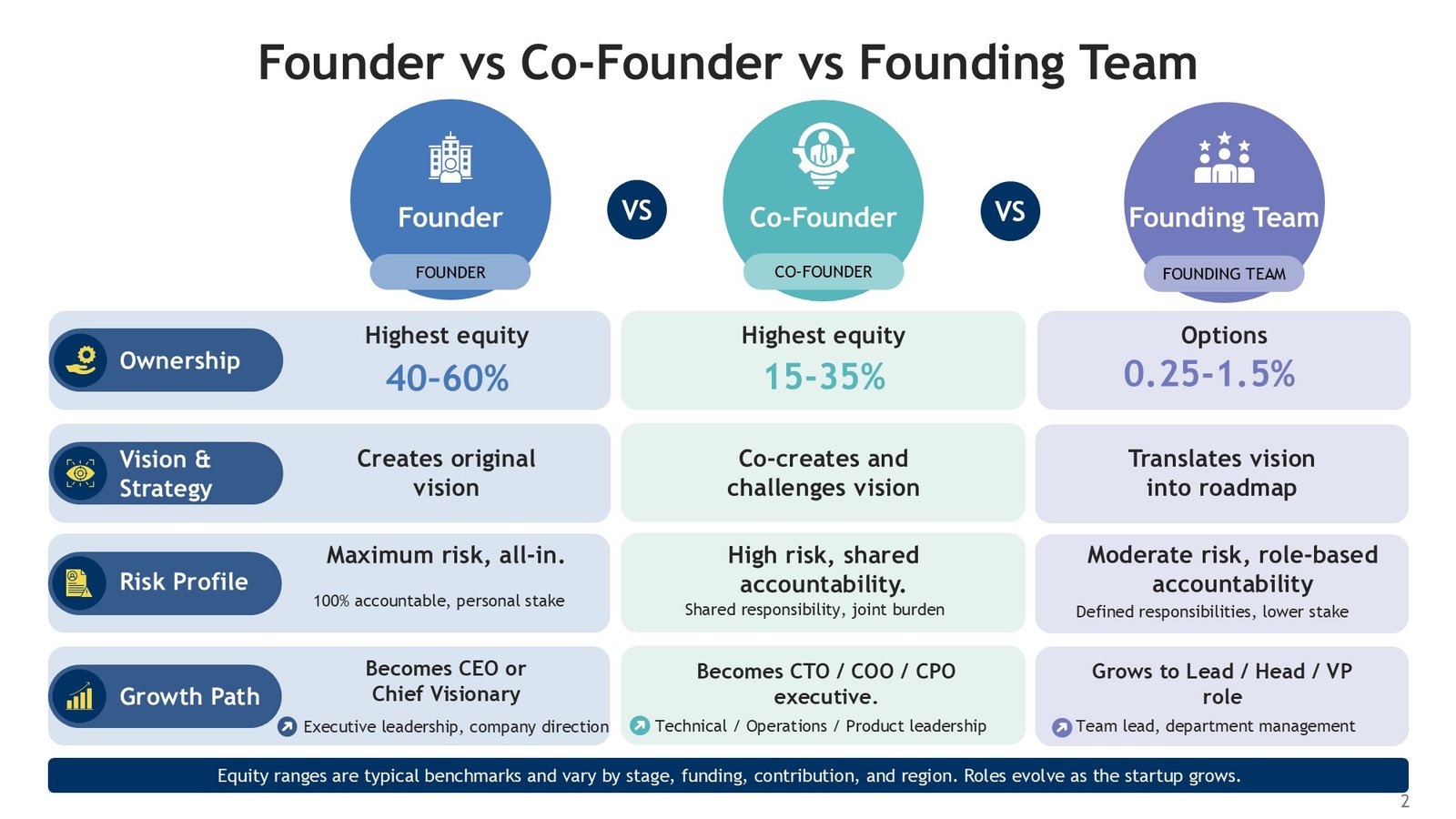
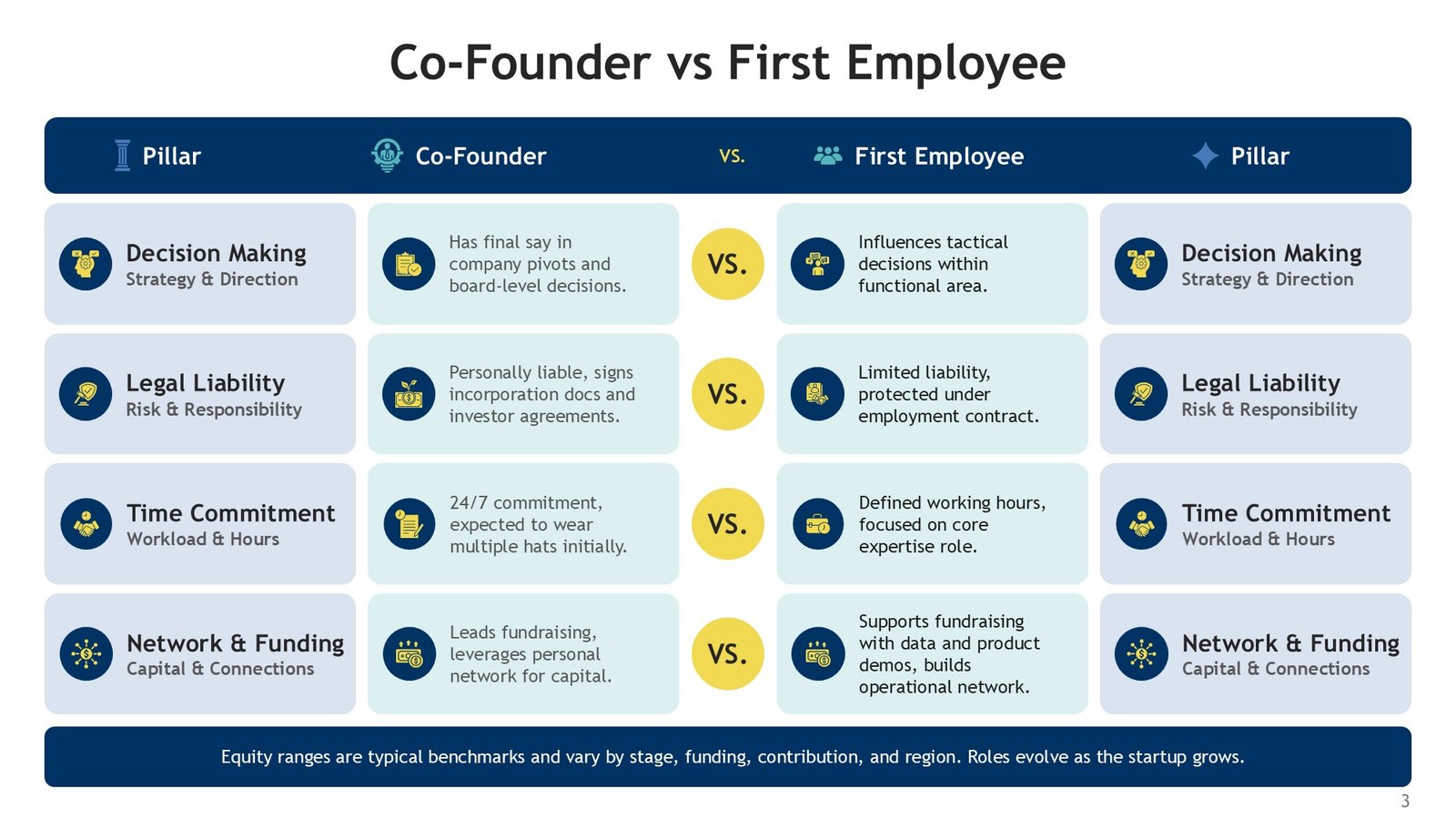
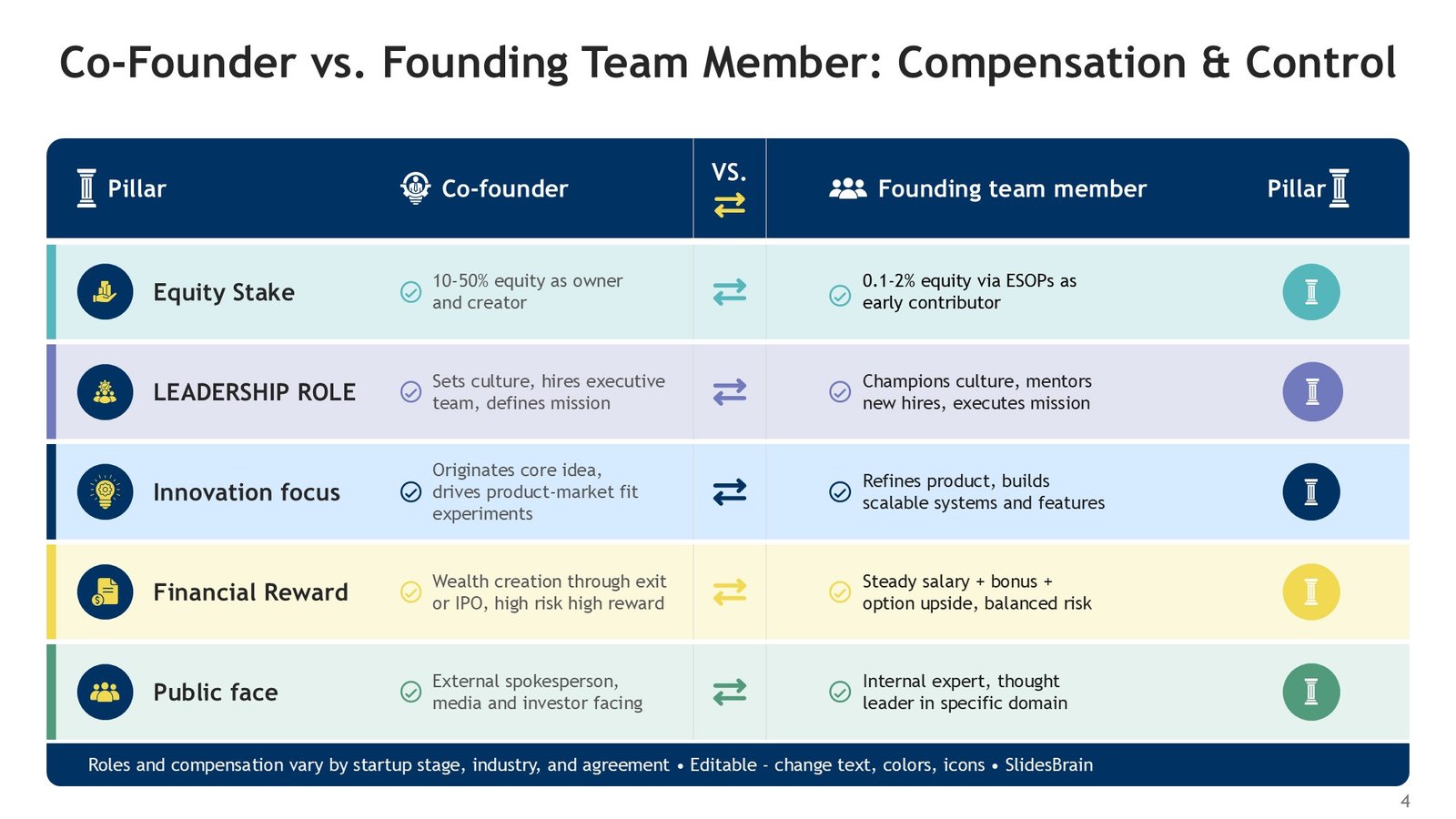
Co-Founder vs Founding Team Comparison PPT Presentation & Google Slides is a professionally designed presentation template to highlight the roles, responsibilities, strengths and overall dynamics of a co-founder vs. a founding team. This template includes 8 sophisticated, infographic-centered slides, and utilizes a diverse, yet refined, color palette of blue, green, yellow and purple, to encompass a simple, yet professional design.
The template is designed for Startup founders, Entrepreneurs, Business Educators, Consultants, and Leadership teams. This template is a visual structure to support in analyzing founder roles, responsibilities, decisions, skills, accountability and collaboration.
The template is also 100% editable and when explaining the different models of startup leadership. Comparing the pros and cons of starting a company alone versus with a co-founder. Teaching entrepreneurship. Presenting a founder strategy to a business audience. This PowerPoint and Google Slides template provides a strong visual foundation for all the above and more.
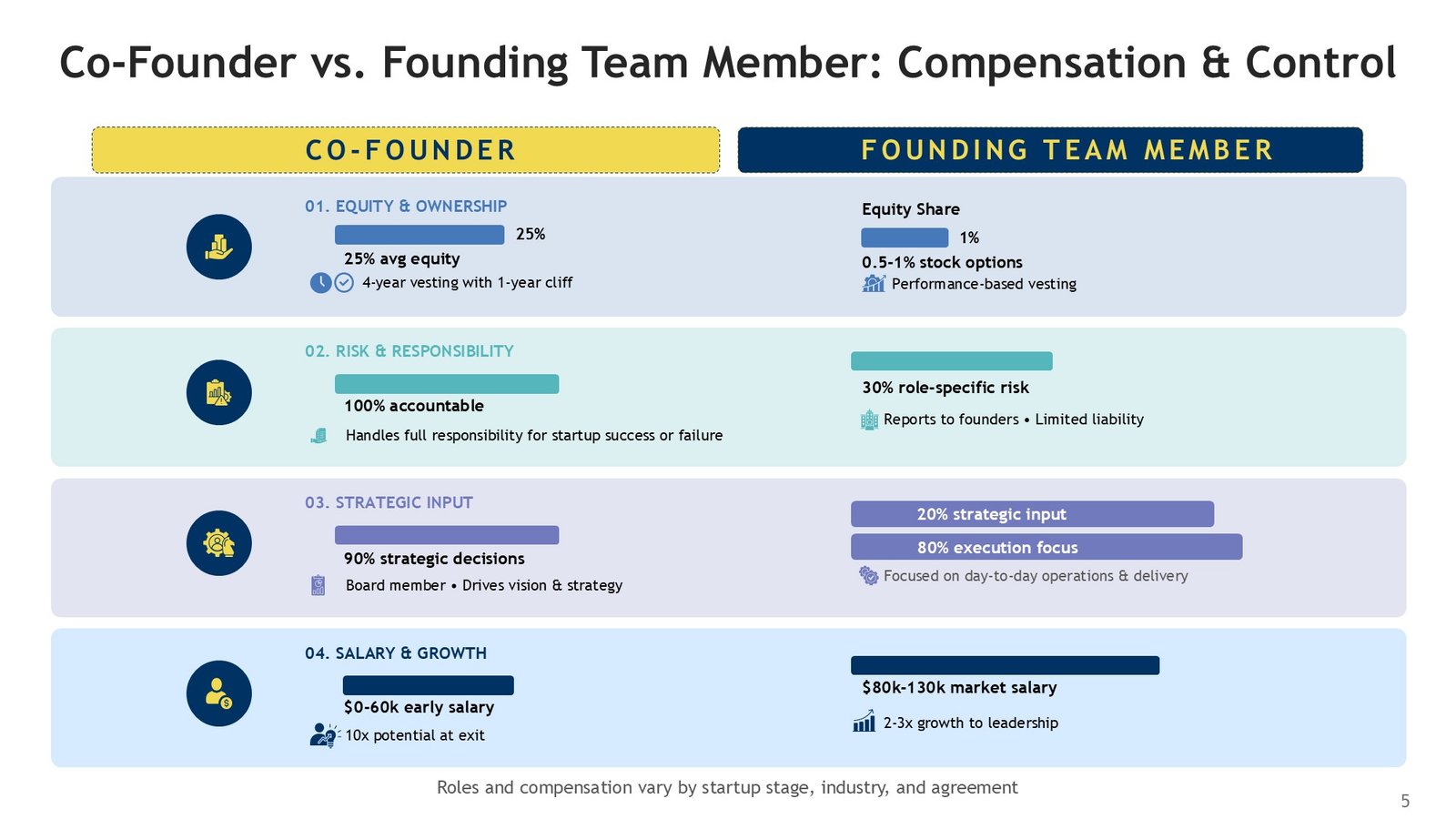
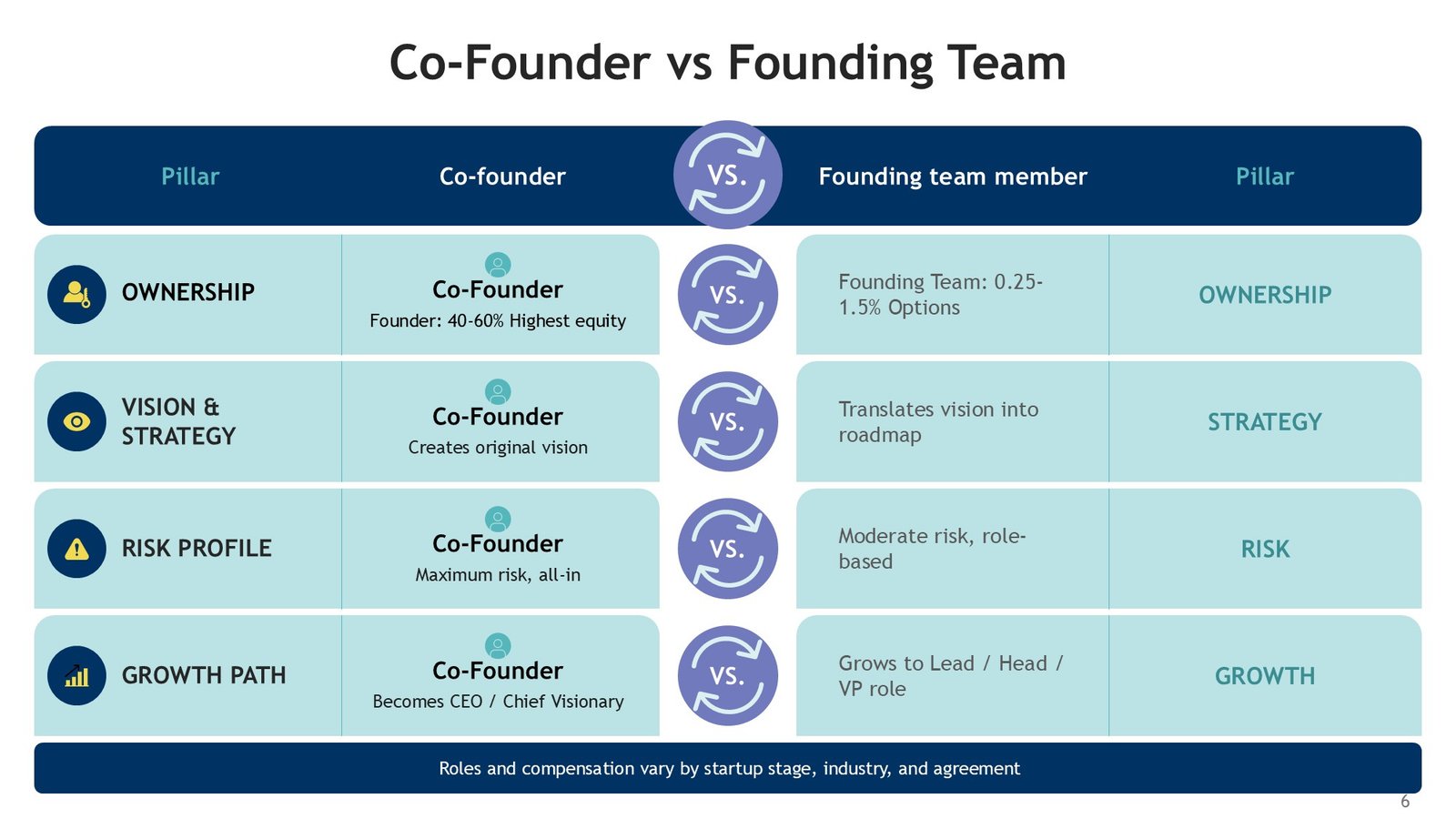
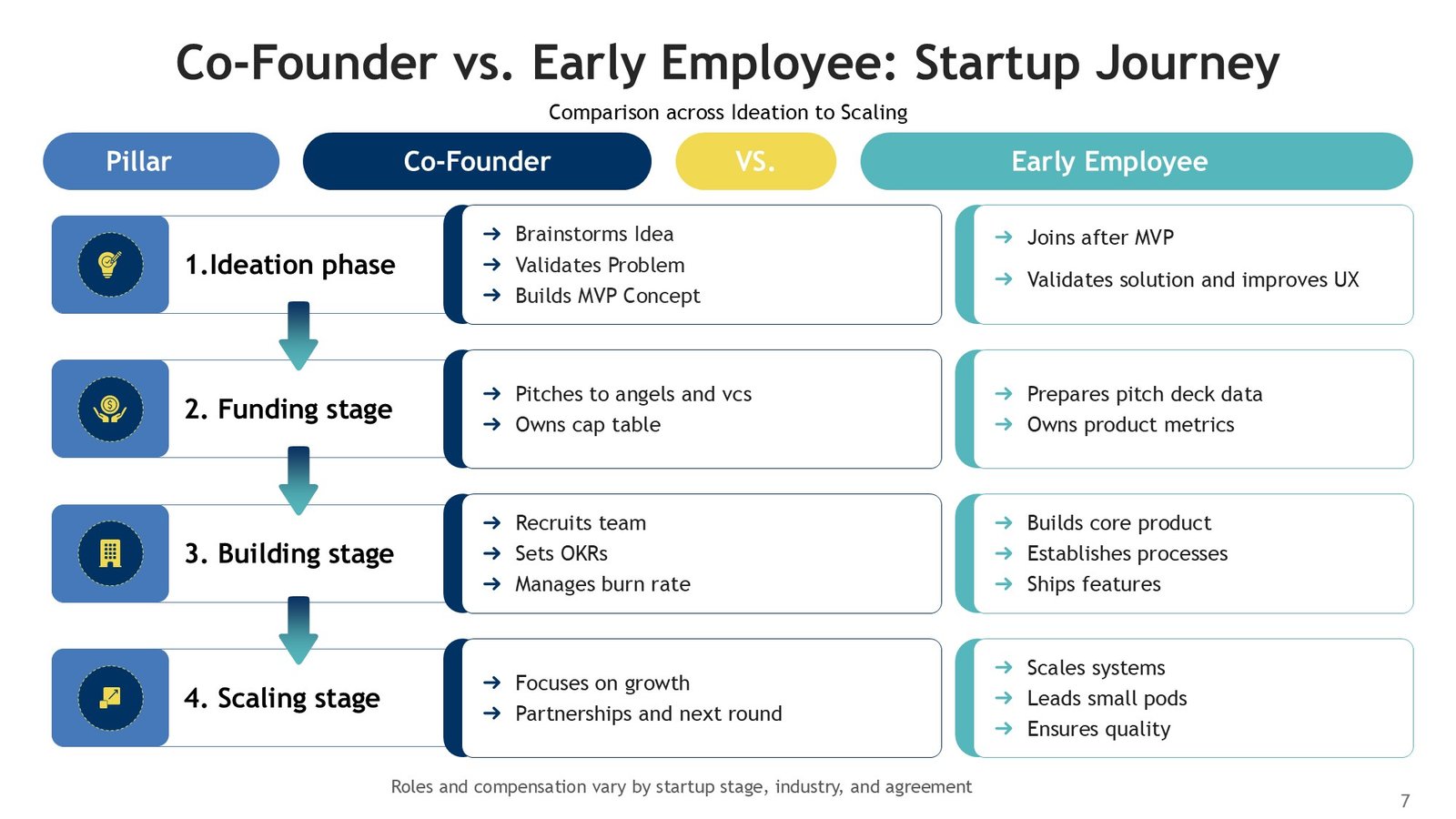
- 8 Premium Comparison Slides: Includes slide layouts to compare co-founder vs founding team responsibilities, skills, decision-making, advantages, challenges, and other important considerations.
- Blue, Green, Yellow & Purple Palette: A diverse yet professional color combination to easily distinguish comparison points.
- Minimalist & Professional Design: Easily readable, content structured, and organized layouts.
- Infographic-Based Visuals: Includes editable comparison charts, checklists, diagrams, process layouts and other structured business frameworks.
- 100% Fully Editable: Directly edit text, colors, and other elements in PPT and GSlides.
- Business & Education Focused: Use for startup strategy, entrepreneurship education & training, leadership development, founder & business planning, and related workshops.
- 16:9 Widescreen: Designed for class, workshop, meeting, board, and web presentations.
- PowerPoint & Google Slides Compatible: Customize & shift order of slides for both presentations.
Perfect For:
- Startup Founders & Entrepreneurs
- Business Consultants
- Startup Accelerators & Incubators
- Entrepreneurship Educators
- Business Students
- HR & Organizational Leaders
- Startup Coaches & Advisors
FAQ’s
Is this Co-Founder vs Founding Team presentation editable?
Yes. All 8 slides of this presentation are fully editable. With this, you can easily modify text, color, and other elements as you see fit.
What is the difference between a co-founder and a founding team?
Like explained in the presentation, a co-founder generally refers to the person who starts a company together with one or more founders. A founding team, on the other hand, refers to the group of people who start and build a company. The group can vary depending on the company.
Can this presentation explain responsibilities of a founder?
Yes. This is particularly useful for explaining comparison of responsibilities of a founder. You can easily modify slides to reflect founder’s decision making, accountability, skills, ownership, and collaboration.
Is this template useful for startup presentations?
This template is very useful for explaining startups to founders, planning sessions for founders, entrepreneur workshops for teams, and other related activities.
Is this template useful for education on entrepreneurship?
Yes, this template is very useful for education on entrepreneurship and business schools.
Can I compare advantages and challenges of various founding structures?
Yes. There are a number of comparison-friendly layouts in the template to illustrate advantages, limitations, opportunities, and challenges of different founding and team structures.
Can I modify the blue, green, yellow, and purple palette?
Yes. All colors can be modified and you can redesign the slides to reflect the color palette of your startup, school, company, or organization.
Are comparison tables and checklists included?
Yes. The presentation includes pictograms, comparison charts, checklists, cards, diagrams, and other visual aids to help you create an information diagram, flow chart, or an organization chart, among others.
Is the design suitable for professional business presentations?
Yes. The minimalist, professional, and simple design makes it suitable for executive discussions, consulting presentations, startup workshops, leadership meetings, and business education.
Can startup advisors use this presentation with founders?
Yes. Startup advisors, coaches, mentors, and consultants can use the slides to facilitate discussions around founder roles, complementary skills, team structure, responsibilities, and collaboration.
Can I use this template to discuss founding-team skills?
Yes. You can customize the infographic layouts to compare technical, business, leadership, product, sales, marketing, finance, and operational skills within a founding team.
Can this presentation be used for a co-founder selection discussion?
Yes. The comparison and checklist layouts can be adapted to evaluate factors such as complementary skills, shared vision, communication, responsibilities, working styles, and long-term alignment.
Can I add my own startup examples and case studies?
Yes. The editable content areas allow you to add examples, scenarios, case studies, statistics, or company-specific information to make the presentation relevant to your audience.
Is this template suitable for Google Slides?
Yes. The presentation can be imported into Google Slides, where you can edit compatible text, shapes, colors, tables, icons, and infographic elements.
Who can benefit most from this presentation?
The template is particularly useful for startup founders, entrepreneurs, business students, educators, startup accelerators, consultants, coaches, and leadership teams discussing founder structures and startup team dynamics.




 MS Powerpoint
 Google Slides