Frequently Asked Questions

Google Slides Templates FAQ

What are Google Slides templates?

Google Slides templates are professionally pre-designed presentation frameworks that contain customized layouts, asset metrics, color systems, and typographic hierarchies. These files help users create engaging and visually appealing presentations without designing every slide from scratch. 

These templates typically include ready-made layouts, coordinated color schemes, fonts, charts, icons, infographics, and visual elements that can be customized to suit different topics and industries. Instead of spending hours on design work, users can focus on organizing their content and delivering a clear message. 

Whether you’re creating a business proposal, marketing strategy, or academic report, using a professionally designed template significantly improves both the appearance and effectiveness of your slides. 

How do I get templates for Google Slides?

To get Google Slides templates, you download a presentation file (such as a .pptx or https://slidesbrain.com/product/free-sunday-sermon-church-powerpoint-presentation/) from an external design library and import it directly into your cloud dashboard.

Users can browse presentation template websites, online design libraries, educational platforms, or professional presentation resources that offer downloadable files for different industries. After selecting a template, download the file and upload it to Google Drive. Once uploaded, open the file with Google Slides and begin customizing it with your own text, images, branding, charts, and visual elements. 

Most templates are designed to be user-friendly, making customization easy even for people with little design experience. Selecting a layout that aligns with your audience and presentation goals helps create a more impactful and professional presentation.

Where can I download free Google Slides templates?

You can download high-quality, free Google Slides templates from dedicated presentation asset platforms like SlidesBrain. These specialized online platforms provide layouts for business presentations, educational projects, healthcare reports, startup pitches, marketing campaigns, and many other presentation categories. 

When choosing a template, it’s important to look for clean layouts, modern design elements, customization flexibility, and native compatibility with both Google Slides and PowerPoint. High-quality templates often include editable charts, icons, infographics, and professional slide layouts that can save hours of manual design work. Users looking for professionally designed presentation resources can explore the SlidesBrain Free Templates catalog to improve presentation quality and audience engagement. 

Are Google Slides templates free to use?

Many Google Slides templates are available completely free of charge for personal, educational, and professional projects, while specialized layouts require a premium license. Free templates are especially popular among students, teachers, entrepreneurs, freelancers, and businesses looking to create attractive presentations without investing in custom design services. 

However, some template providers also offer premium templates that include advanced designs, unique multi-tier layouts, specialized data charts, and additional asset customization features. Before downloading a template, it is always recommended to review the licensing terms and usage rights. For many users, free templates offer an excellent balance between professional design quality and affordability while allowing full customization based on individual presentation requirements. 

What is the best website for Google Slides templates?

The best website for Google Slides templates is a platform that offers industry-specific designs, clear commercial licensing, and precise platform compatibility. The right platform depends heavily on the type of presentation you want to create. Different platforms specialize in business presentations, educational resources, marketing reports, or niche categories. 

When evaluating a template website, consider factors such as design quality, template variety, ease of customization, cross-platform compatibility, and user experience. SlidesBrain is one of the premier resources that provides a curated matrix of premium and free Google Slides templates across multiple categories, making it easier for users to find presentation designs that match their specific requirements and audience expectations. 

Can I Download Google Slides Templates for Free?

Yes, you can download Google Slides templates for free without any hidden fees or registration locks on selected open-access design platforms. Free templates are commonly used for business meetings, educational projects, startup presentations, marketing reports, training programs, research presentations, and corporate communications. 

Most free templates include professionally designed layouts, customizable text sections, image placeholders, charts, icons, and visual elements that can be modified according to specific presentation goals. This makes them suitable for both beginners and experienced presentation creators. Platforms such as SlidesBrain offer comprehensive free Google Slides templates that help users create professional-looking presentations while saving time and maintaining design consistency throughout their slides. 

How do I customize a Google Slides template?

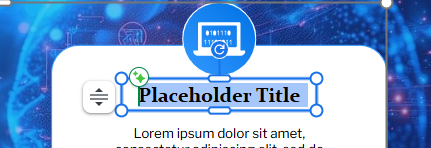
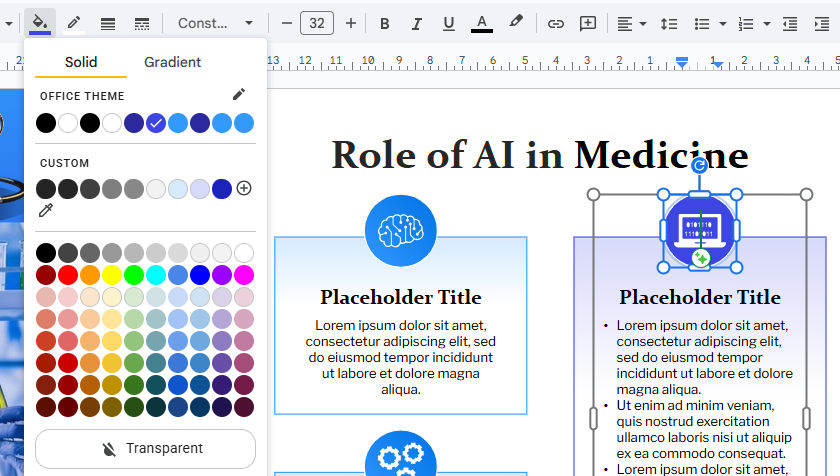
To customize a Google Slides template, open the template file within Google Slides and use the built-in editing toolbars to replace placeholder text, swap background graphics, and adjust color palettes. Customizing a template is straightforward and requires no advanced design skills. 

Once the template is opened in Google Slides, users can replace placeholder text with their own content, upload images, adjust colors, modify fonts, and edit charts or diagrams to match their presentation goals. Many templates are designed with complete system flexibility in mind, allowing users to personalize every slide while maintaining a professional appearance. 

Businesses can add branding elements such as logos and company colors, while students and educators can modify layouts to suit specific projects or lessons without affecting the overall design quality. 

Can I edit Google Slides templates?

Yes, Google Slides templates are 100% fully editable down to individual shape vectors, text boxes, and line colors. Users can modify text, images, icons, colors, backgrounds, charts, diagrams, and slide layouts to create presentations that reflect their unique content and branding. 

Editing templates allows users to save time while maintaining a polished and professional design. Instead of building slides from scratch, they can focus on improving the content and presentation structure. 

This flexibility makes Google Slides templates suitable for a wide range of purposes, including business proposals, educational projects, sales presentations, training materials, company reports, and marketing campaigns. Even users with limited design experience can create visually appealing presentations by simply customizing an existing template to fit their needs.

Are Google Slides templates compatible with PowerPoint?

Yes, most professional Google Slides templates feature native cross-platform compatibility and can be downloaded as standard .pptx files for Microsoft PowerPoint. Many template providers create presentation files that can be used seamlessly across both platforms, making it easier for users to switch between Google Slides and PowerPoint when needed. 

Compatibility is especially important for businesses, educational institutions, and professionals who collaborate with people using different presentation software. A compatible template helps preserve layouts, images, fonts, charts, and visual elements across platforms. 

SlidesBrain and other professional template providers design themes that natively support both Google Slides and PowerPoint formats. This flexibility allows users to create, edit, and present their slides using the platform that best fits their workflow and presentation requirements.

Can I use PowerPoint templates in Google Slides?

Yes, you can use PowerPoint templates in Google Slides by uploading the .pptx file to Google Drive and converting it into a Google Slides presentation. Simply upload the PowerPoint file to Google Drive and open it using Google Slides. The platform will automatically convert the presentation into an editable Google Slides format. While most design elements, shape vectors, and structural matrices are preserved during the conversion process, some advanced animations, custom local fonts, or specialized formatting features may require minor manual adjustments. It is always a good idea to review the presentation after importing it to ensure everything appears correctly. This compatibility allows users to access a broader range of presentation templates and makes collaboration easier across different software environments. 

What Are the Best Google Slides Templates for Students?

The best Google Slides templates for students are clean, modern layouts that feature built-in data charts, educational infographics, and timeline structures to display information clearly. Students often need presentations for classroom projects, research assignments, science fairs, group discussions, case studies, and academic reports. A well-designed template helps organize information hierarchically while keeping the audience focused on the key message. 

Popular student presentation templates include research layouts, science project slides, project proposals, and classroom report designs. These templates often include charts, timelines, diagrams, and image placeholders that make complex information easier to understand. Using a professionally designed template saves time and helps students present their ideas with confidence.

What Are the Best Google Slides Templates for Teachers?

The best Google Slides templates for teachers are interactive layouts that utilize clear typography, lesson plan structures, and highly visible visual aids for online or offline learning. Teachers frequently use presentations to explain concepts, conduct lessons, share classroom activities, and engage students during both online and offline learning sessions. The best Google Slides templates for teachers include lesson plan presentations, workshop slides, educational reports, training materials, and learning modules. 

A good educational template should have clean layouts, readable typography, and visual elements that help students understand information more effectively. Interactive slides, diagrams, timelines, and infographic sections can make lessons more engaging and easier to follow, helping educators maintain consistency across lessons while saving preparation time. 

Which Google Slides templates are best for business presentations?

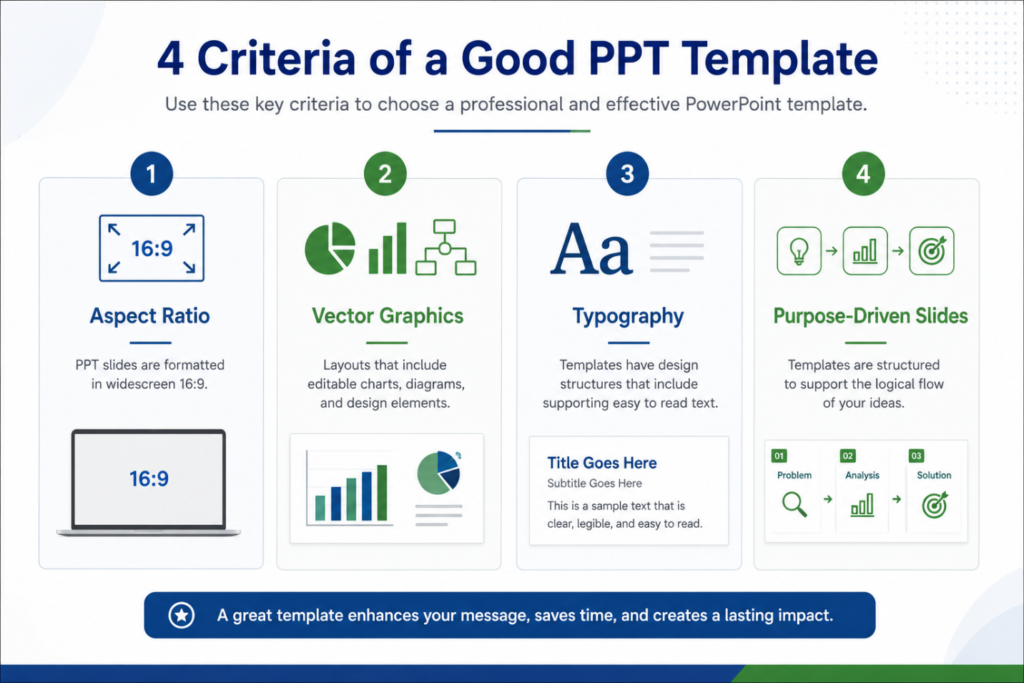
The best business presentation templates utilize corporate layout systems, high-contrast typography, 16:9 widescreen structures, and custom data visualization frameworks. Business presentations require professional design, clear communication, and effective data visualization. The most commonly used business templates include company profiles, business proposals, project reports, sales presentations, investor pitch decks, annual reports, and marketing strategy presentations. 

Features such as data tables, financial graphs, project timelines, comparison grids, and clean infographics help present information clearly and professionally. For specialized corporate deployments, exploring the SlidesBrain Presentation Templates asset matrix provides an optimized, pre-formatted solution to strengthen brand credibility and help communicate ideas more effectively to clients, investors, or stakeholders. 

Can I use Google Slides templates for commercial projects?

Yes, you can use Google Slides templates for commercial projects like client pitches, revenue campaigns, and corporate reports, provided the asset’s license explicitly grants commercial rights. Commercial use rights vary depending on the source of the template. Some open-source templates allow unrestricted commercial use, while premium or proprietary layouts may require explicit licensing or attribution to the author. Understanding these conditions helps avoid potential copyright or licensing issues. 

Businesses often rely on presentation templates to save time, maintain brand consistency, and create professional presentations. Choosing a template with the appropriate usage rights ensures that presentations can be used confidently for client-facing and revenue-generating activities.

How do I upload a template into Google Slides?

To upload a template into Google Slides, navigate to Google Drive, click + New > File upload, select your template file, and then right-click the uploaded file to choose Open with > Google Slides. First, download the template file to your computer. Once the file has been uploaded to Google Drive, opening it with Google Slides makes the presentation fully editable, allowing you to replace placeholder text, update images, customize colors, and add your own content. 

Many users download presentation templates from trusted resources such as SlidesBrain and upload them directly into Google Slides for editing. This process makes it easy to start working with professionally designed templates while maintaining full control over customization and branding.

Are Google Slides templates suitable for online presentations?

Yes, Google Slides templates are highly optimized for online presentations because they are built natively on cloud-based systems that enable seamless screen sharing and remote collaboration. They are widely used for webinars, virtual meetings, online training sessions, remote learning, and digital conferences. 

A well-designed template helps maintain audience engagement during virtual presentations by organizing information clearly and presenting content in a visually appealing manner. Features such as infographics, diagrams, charts, and modern layouts can improve communication and information retention. Since Google Slides supports real-time collaboration, team members can work together on presentations from different locations, making it an excellent choice for modern organizations. 

Do Google Slides templates work on mobile devices?

Most templatYes, Google Slides templates work fully on mobile devices through the official Google Slides application available for iOS and Android. Users can view, edit, share, and present their slides from virtually anywhere using mobile devices. This flexibility is especially useful for business professionals, students, teachers, and remote teams who need access to presentations while traveling or working outside the office. es automatically adjust to different screen sizes while maintaining their overall design and layout structure. Although advanced editing is generally easier on a desktop or laptop, mobile devices allow users to make quick updates, review presentations, and collaborate with team members on the go.

How can I make my Google Slides presentation look professional?

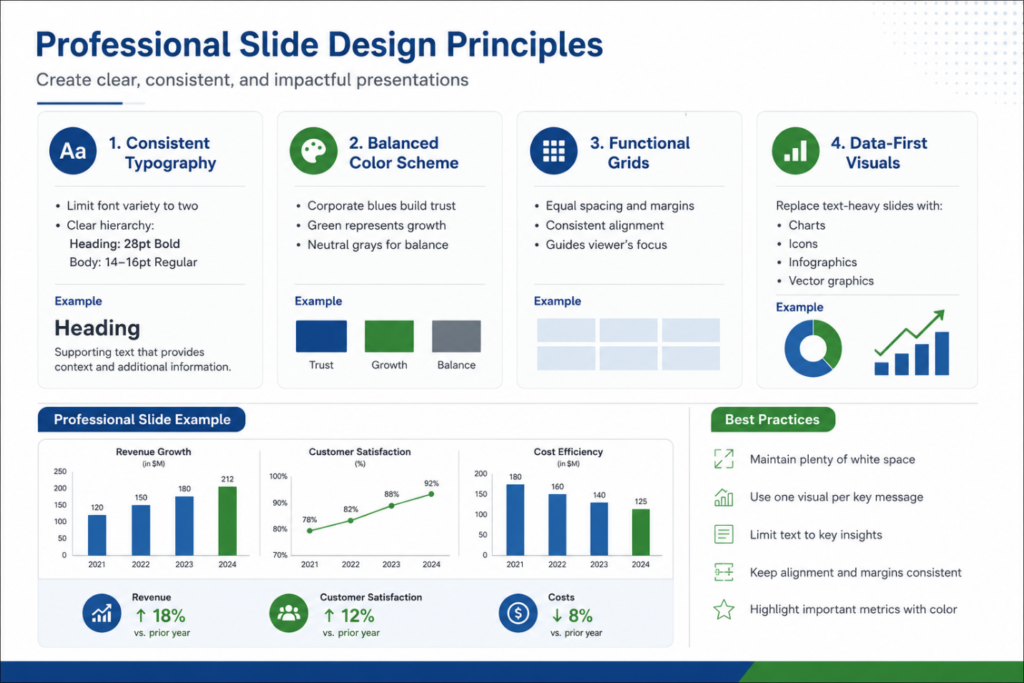
To make a Google Slides presentation look professional, maintain a strict 2-3 color palette, use consistent sans-serif typography, incorporate high-quality vector icons, and leave sufficient whitespace. Start by choosing a clean and modern template that matches your presentation topic and audience. Maintain consistent fonts, colors, and formatting throughout the presentation to create a polished appearance. 

Use high-quality images, icons, charts, and infographics to support your message, and avoid overcrowding slides with excessive text. Many presenters use professionally designed templates from platforms like SlidesBrain to achieve a polished and consistent look. Combined with clear content and strong visuals, a good template significantly enhances presentation effectiveness.

The most popular Google Slides themes include minimal corporate designs, dark-mode technology layouts, creative marketing decks, and modular startup pitch frameworks. These themes are popular because they offer professional layouts that work well across different industries and presentation types. Modern themes often include customizable charts, timelines, data visualizations, icon sets, and infographic elements. These features help users present information more clearly while maintaining visual appeal. 

The popularity of a theme often depends on the presentation’s purpose and audience. Business professionals typically prefer clean corporate designs, while educators and students may choose more creative and engaging themes found across the SlidesBrain Style Collection.

Can I download premium-looking Google Slides templates for free?

Yes, you can download premium-looking Google Slides templates for free by utilizing curated free-tier catalogs on top presentation design platforms. These templates often feature modern layouts, professional typography, elegant color schemes, high-quality graphics, and fully editable slide designs that resemble premium presentation products. 

Free premium-style templates are popular among students, entrepreneurs, marketers, educators, and business professionals who want professional results without additional design costs. Platforms such as SlidesBrain provide both free and premium presentation templates, allowing users to choose designs that fit their specific requirements and build presentations that look highly professional without starting from scratch. 

Are Google Slides templates suitable for startups?

Yes, Google Slides templates are highly suitable for startups, providing pre-built pitch decks, market size (TAM/SAM) diagrams, and financial projection models to attract investors. Startups often need presentations for investor meetings, fundraising rounds, business plans, product launches, sales pitches, market analysis, and growth strategies. 

A professionally designed template allows founders and teams to focus on their message rather than spending hours creating slides from scratch. Features such as data visualizations, timelines, financial projections, team introductions, and market opportunity sections help communicate ideas more effectively. Startup templates are particularly useful when presenting to investors because they provide a structured framework for showcasing business potential and leaving a stronger impression.

Which Google Slides templates are best for marketing presentations?

The best marketing presentations use conversion-focused layouts featuring KPI dashboards, social media growth charts, campaign timelines, and competitor matrix tables. Popular marketing templates include digital marketing reports, social media performance presentations, SEO reports, advertising campaign reviews, sales presentations, and brand strategy decks. 

A strong marketing template should include charts, graphs, timelines, and visual elements that make performance data easier to understand. Templates designed specifically for marketing presentations help improve storytelling and data visualization. By using a structured presentation layout, marketing professionals can explain complex campaign information more clearly while maintaining audience interest. 

What are the best educational Google Slides templates?

The best educational templates incorporate visual learning aids like tree diagrams, step-by-step process timelines, and interactive quiz layouts. Some of the most commonly used educational templates include lesson plans, classroom activities, science projects, academic reports, research presentations, training modules, and workshop presentations. 

The best educational templates combine clear organization, attractive visuals, and user-friendly layouts. Features such as diagrams, timelines, charts, illustrations, and infographic sections can make learning materials more engaging and easier to follow. These templates are widely used by students, teachers, trainers, and educational institutions because they help present information in a structured and visually appealing format. 

How do I choose the right Google Slides template?

To choose the right template, match your presentation’s target demographic with a layout that offers the precise text density, color tone, and functional charts your data requires. Consider factors such as color schemes, typography, slide layouts, visual elements, and the amount of content you plan to include. Templates with clear organization and modern design often provide a better viewing experience for audiences.

It is also important to select a template that supports deep customization and aligns with your branding or presentation objectives. Many presentation resources, including SlidesBrain, offer templates across multiple categories, making it easier to find a design that matches your specific goals and industry requirements.

Are Google Slides templates better than creating slides from scratch?

Yes, Google Slides templates are better than creating slides from scratch because they establish consistent structural spacing, balanced color palettes, and professional asset grids instantly. 

Templates save time, ensure visual consistency, and offer professionally designed layouts that would otherwise require advanced design expertise to create. Starting with a template allows users to focus on developing content rather than spending hours on formatting, spacing, color selection, and layout design. 

Templates often include ready-made charts, diagrams, infographics, and visual elements that improve presentation quality. While custom-designed presentations may be appropriate for highly specialized corporate branding projects, templates are generally the more practical and efficient option. 

How do I change the theme in Google Slides?

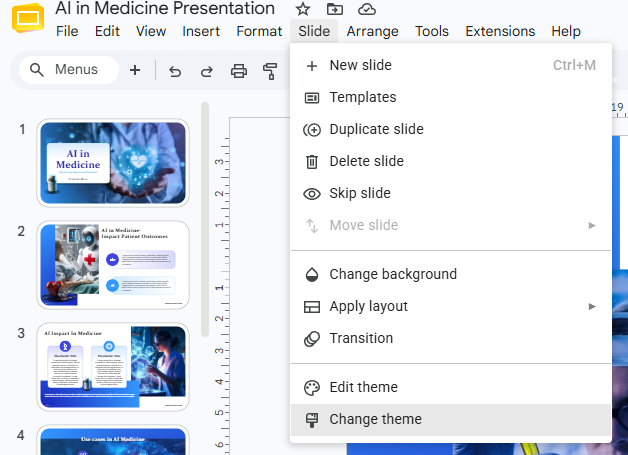
To change the theme in Google Slides, open your presentation file, click on the Slide menu in the top toolbar, and select the Change theme option. A panel containing available themes will appear on the right side of the screen, allowing you to choose a new design instantly. Applying a theme updates colors, fonts, backgrounds, and slide layouts throughout the presentation, helping maintain visual consistency without requiring manual design changes on every individual slide. 

Users looking for more professional or industry-specific designs often download custom Google Slides templates from platforms such as SlidesBrain and apply them to their presentations for greater flexibility and access to a wider variety of modern presentation styles.

Can I use Google Slides templates offline?

Yes, you can use Google Slides templates offline by opening Google Drive, navigating to Settings, and checking the box next to Offline mode. Once enabled, presentations can be viewed, edited, and updated without an active internet connection. 

Offline access is particularly useful for professionals traveling for business, students studying in areas with limited connectivity, or presenters preparing for meetings in locations where internet access may be unreliable. 

Changes made while offline are automatically synchronized once the device reconnects to the internet. This flexibility allows users to continue working on presentations without interruptions and ensures productivity regardless of network availability.

How do I share a Google Slides presentation with my team?

To share a Google Slides presentation, click the blue Share button in the upper-right corner of your screen, input your team members’ email addresses, and set their permission access tier. You can assign different permission levels, including viewer, commenter, or editor access, ensuring that each team member has the appropriate level of control over the file. 

Another option is to generate a shareable link that can be distributed through email, messaging platforms, or project management tools. Real-time collaboration allows multiple users to work on the same presentation simultaneously, improving teamwork and streamlining the presentation development process.

How do I save Google Slides as a PDF?

To save a Google Slides presentation as a PDF, go to the top navigation toolbar and click File > Download > PDF Document (.pdf). Google Slides will automatically generate and download a static PDF version of the presentation to your local device. 

The PDF format ensures that recipients can view the presentation consistently, regardless of the software, operating system, or device they use. PDF files are commonly used for client presentations, academic submissions, training materials, business reports, and presentation handouts because they provide a professional and secure format for sharing information. 

How do I convert a Google Slides presentation to PowerPoint?

To convert a Google Slides presentation to PowerPoint, select File > Download from the menu bar and click Microsoft PowerPoint (.pptx). The file will then be downloaded in PowerPoint format and can be opened natively using Microsoft PowerPoint. This conversion is highly useful when collaborating with users who primarily work within the Microsoft Office ecosystem. 

Most formatting, images, vector shapes, charts, and layouts are preserved cleanly during the conversion process, although it is recommended to briefly review the presentation afterward to ensure everything appears correctly. Many modern presentation templates, including those available on SlidesBrain, are designed to support both Google Slides and PowerPoint, allowing users to move between platforms effortlessly. 

Free PPT Templates FAQ

Where Can I Download Free PPT Templates?

Free PPT templates can be downloaded from a variety of presentation resource websites that offer professionally designed templates for business, education, healthcare, marketing, startups, training programs, church presentations, and more. These templates are designed to help users create visually appealing presentations without spending hours designing slides from scratch.

When choosing a template, look for modern layouts, editable graphics, organized slide structures, and compatibility with popular presentation software. High-quality templates often include charts, infographics, icons, and professional design elements that improve the overall presentation experience.

Users looking for ready-to-use presentation designs can explore SlidesBrain, which offers a growing collection of free and premium PowerPoint templates suitable for different industries and presentation purposes.

What Are the Best Free PPT Templates?

The best free PPT templates depend on the type of presentation you plan to create and the audience you want to reach. Business professionals often prefer company profile templates, project reports, investor pitch decks, and sales presentations. Students may benefit from research presentations, classroom projects, and educational report templates.

Marketing professionals frequently use campaign reports, SEO presentations, social media reports, and strategy templates, while healthcare professionals often require medical and healthcare-focused layouts.

A great template should provide a balance of visual appeal, readability, and flexibility. The most effective templates help users communicate information clearly while maintaining a professional appearance throughout the presentation.

Are Free PPT Templates Safe to Download?

Yes, free PPT templates are generally safe to download when they come from trusted and reputable presentation websites. Reliable sources focus on providing professionally designed presentation files without including harmful software, malware, or unnecessary downloads.

Before downloading any template, it is important to verify the credibility of the website and ensure that the files are offered in standard presentation formats such as PPTX. Reading user reviews and checking the website’s reputation can also help ensure a secure experience.

Platforms such as SlidesBrain provide professionally designed presentation templates intended for educational, business, and professional use. Downloading templates from trusted resources helps maintain both security and presentation quality.

How Do I Find High-Quality Free PPT Templates?

Finding high-quality free PPT templates requires evaluating several important factors. Look for templates that feature modern layouts, professional typography, balanced color schemes, editable graphics, and organized content sections. These elements contribute to a polished and professional presentation.

High-quality templates should also provide flexibility, allowing users to customize colors, fonts, images, charts, and layouts according to their needs. Templates designed with clear visual hierarchy often improve readability and audience engagement.

A well-designed template not only saves time but also helps communicate ideas more effectively. Choosing templates from trusted presentation platforms ensures better design quality and a smoother presentation creation experience.

What Types of Free PPT Templates Are Available?

Free PPT templates are available across a wide range of industries, topics, and presentation styles. Common categories include business presentations, company profiles, project proposals, marketing reports, startup pitch decks, healthcare presentations, educational projects, research reports, church sermons, and training materials.

Some templates focus on data visualization, while others emphasize storytelling, branding, or educational content delivery. Users can also find templates designed specifically for annual reports, consulting presentations, sales meetings, webinars, and workshops.

The variety of available templates allows users to select designs that match their specific presentation goals and audience expectations while maintaining a professional appearance.

Where Can I Download Free PowerPoint Templates Without Registration?

Many users prefer downloading templates without the need to create accounts or complete lengthy registration processes. Several presentation websites offer direct access to downloadable PowerPoint templates, allowing users to save time and start working on their presentations immediately.

When selecting a template source, consider the quality of designs, ease of download, and availability of editable presentation files. Templates should provide professional layouts and sufficient customization options for different presentation requirements.

SlidesBrain offers a variety of presentation templates that are designed to simplify the presentation creation process while providing professional-quality slide designs suitable for multiple industries and use cases.

Are Free PowerPoint Templates Suitable for Professional Presentations?

Yes, professionally designed free PowerPoint templates can be highly effective for professional presentations. Many free templates include modern layouts, business-friendly structures, clean typography, and visual elements that support clear communication.

Organizations commonly use free templates for meetings, project updates, company profiles, client presentations, sales proposals, and internal reports. The key is selecting a design that aligns with the company’s branding and presentation objectives.

A high-quality template combined with strong content can create a professional impression and help presenters communicate information more effectively without the expense of custom design services.

What Are the Best Free PowerPoint Templates for Business?

Business presentations require clear structure, professional design, and effective information delivery. Popular business templates include company profiles, project reports, investor pitch decks, annual reports, consulting presentations, business proposals, sales presentations, and strategic planning decks.

The best business templates typically feature organized layouts, editable charts, modern visuals, and professional typography. These design elements help businesses present information clearly while maintaining credibility and audience engagement.

Selecting a template that matches the purpose of the presentation can improve communication and make it easier for stakeholders, clients, and team members to understand key information.

Can I Use Free PowerPoint Templates for Commercial Purposes?

Many free PowerPoint templates can be used for commercial purposes such as client meetings, company reports, marketing presentations, consulting projects, sales proposals, and business development activities. However, users should always review the licensing terms before using any template in a commercial setting.

Different template providers may have different usage policies. Some templates allow unrestricted commercial use, while others may require attribution or limit certain applications.

Understanding licensing conditions helps businesses avoid potential copyright issues and ensures that presentations are used appropriately. Always verify usage rights before incorporating a template into commercial projects.

How Do I Customize Free PPT Templates?

Customizing a free PPT template is a simple process that allows users to tailor presentations according to their goals, audience, and branding requirements. After opening the template in Microsoft PowerPoint or Google Slides, users can replace placeholder text, insert images, update charts, modify colors, and adjust layouts.

Most modern templates are designed to be fully editable, allowing users to personalize every slide without affecting the overall design structure. Businesses can add logos and brand colors, while educators and students can adapt content for classroom and academic presentations.

Templates provide a professional foundation while still offering complete flexibility, making it easy to create unique and engaging presentations.

What Is Included in a Free PowerPoint Template?

A free PowerPoint template typically includes professionally designed slide layouts, coordinated color schemes, typography styles, image placeholders, charts, icons, infographics, and content sections that help users create presentations more efficiently. Many templates also include title slides, agenda pages, data visualization slides, team introduction sections, timelines, and conclusion slides.

The exact features vary depending on the template category and purpose. Business templates often include charts and financial presentation slides, while educational templates may focus on research findings, lesson plans, and project presentations.

A well-designed template provides a complete presentation framework, allowing users to focus on creating content rather than spending time designing every slide from scratch. This improves productivity and presentation quality.

Are Free PowerPoint Templates Compatible With All PowerPoint Versions?

Most modern PowerPoint templates are designed to work with recent versions of Microsoft PowerPoint. Templates are usually provided in the PPTX format, which is widely supported across Microsoft Office versions and many presentation platforms.

While most templates function properly in newer versions of PowerPoint, some advanced features such as animations, transitions, SmartArt elements, or custom fonts may not appear exactly the same in older software versions. Therefore, it is always recommended to use an updated version of PowerPoint whenever possible.

Professional template providers typically create templates using industry-standard formats to maximize compatibility. This ensures that users can edit, customize, and present their slides with minimal formatting issues.

Can I Use Free PPT Templates in Google Slides?

Yes, free PPT templates can be used in Google Slides with very little effort. Simply upload the PowerPoint file to Google Drive and open it using Google Slides. The platform will automatically convert the presentation into an editable Google Slides format.

Most layouts, images, charts, and design elements are preserved during the conversion process. However, certain advanced animations, transitions, or unique fonts may require small adjustments after conversion.

Many presentation creators prefer this flexibility because it allows them to use professional PowerPoint designs while taking advantage of Google Slides’ cloud-based collaboration features. This makes presentations easier to edit, share, and manage across teams and devices.

Which Website Offers the Largest Collection of Free PowerPoint Templates?

Several presentation websites offer large collections of free PowerPoint templates across various industries and presentation categories. The ideal platform depends on your design preferences, industry requirements, and presentation goals.

When evaluating a template website, look for variety, design quality, ease of customization, download options, and compatibility with multiple presentation platforms. A strong template library should include business presentations, educational projects, healthcare topics, startup pitch decks, marketing reports, training presentations, and more.

SlidesBrain continues to expand its collection of presentation templates across multiple categories, helping users find designs suitable for professional, educational, and creative presentation needs without spending excessive time searching for resources.

How Do I Find Modern Free PowerPoint Templates?

Lorem ipsum dolor sit amet, consectetur adipisicing elit. Optio, neque qui velit. Magni dolorum quidem ipsam eligendi, totam, facilis laudantium cum accusamus ullam voluptatibus commodi numquam, error, est. Ea, consequatur.

How Do I Find Modern Free PowerPoint Templates?

Modern PowerPoint templates can be identified by their clean layouts, professional typography, minimalistic design approach, contemporary color schemes, and effective use of visuals. Modern presentation design focuses on simplicity, readability, and audience engagement rather than excessive decorative elements.

When searching for templates, look for features such as infographic sections, data visualization slides, image-focused layouts, professional icons, and organized content structures. These design elements help create presentations that look current and visually appealing.

Presentation platforms regularly update their collections to reflect modern design trends. Resources such as SlidesBrain frequently publish updated templates that incorporate contemporary presentation styles, helping users create presentations that meet today’s professional standards and audience expectations.

Free PPT templates are popular among professionals because they provide a cost-effective way to create high-quality presentations without hiring designers or spending hours building slides manually. They offer professionally designed layouts that improve communication while maintaining a polished and consistent appearance.

Professionals use templates for business meetings, project reports, client presentations, training sessions, sales pitches, and corporate communications. By using ready-made designs, they can focus more on content development and strategic messaging.

Templates also help organizations maintain consistency across presentations, which strengthens branding and improves professionalism. This combination of convenience, quality, and efficiency makes free PPT templates a valuable resource for many industries.

Can Free PPT Templates Improve Presentation Quality?

Yes, a well-designed template can significantly improve presentation quality by providing structure, visual consistency, and professional design elements. Templates help presenters organize information more effectively and ensure that content is displayed in a clear and engaging format.

Features such as charts, diagrams, infographics, timelines, and image placeholders make presentations easier to understand and more visually appealing. This can increase audience engagement and improve information retention.

While content remains the most important aspect of any presentation, the way information is presented also matters. A professional template helps reinforce key messages and creates a stronger overall impression on viewers.

Are Free PPT Templates Suitable for Startups?

Absolutely. Startups frequently use free PPT templates for investor presentations, fundraising decks, product launches, business plans, and growth strategy discussions. These templates provide a professional framework that helps founders present their ideas clearly and confidently.

Startup templates often include sections for market analysis, business models, competitive advantages, revenue projections, and team introductions. This structure helps ensure that important information is presented in a logical and persuasive manner.

Using a professionally designed template allows startup teams to focus on refining their business message rather than spending excessive time on slide design, making presentations more efficient and impactful.

What Should I Look for Before Downloading a Free PPT Template?

Before downloading a template, evaluate its design quality, customization options, compatibility, and overall structure. A good template should offer clean layouts, readable typography, organized content sections, and editable design elements.

Consider whether the template aligns with your presentation purpose and audience expectations. Business presentations may require formal and professional designs, while educational or creative projects may benefit from more engaging visual styles.

It is also important to verify the template’s licensing terms, especially if you plan to use it for commercial purposes. Choosing the right template from the beginning can save time and improve the effectiveness of your presentation.

Are Free PPT Templates Better Than Creating Presentations From Scratch?

For most users, free PPT templates offer significant advantages over starting from a blank presentation. Templates provide a professionally designed foundation that saves time and ensures visual consistency across all slides.

Instead of focusing on layout design, font selection, color coordination, and formatting, users can concentrate on creating valuable content and delivering their message effectively. This improves productivity while maintaining presentation quality.

Although custom presentations may be necessary for highly specialized projects, templates are generally the more practical choice for business professionals, educators, students, marketers, and organizations seeking efficient and professional presentation solutions.

PowerPoint Templates FAQ.

What are PowerPoint templates?

PowerPoint templates are professionally designed, pre-formatted presentation files that establish a complete visual framework for your slides. Unlike a blank presentation, a high-quality template includes built-in slide masters, coordinated color palettes, typography pairs, and custom layouts for data visualization.

These resources are engineered to streamline content creation across diverse industries, from corporate boardrooms and startup pitch decks to academic research presentations. By utilizing pre-built structures, users can bypass the time-consuming design phase and focus entirely on inputting their core messaging.

Where can I download free PowerPoint templates?

Free PowerPoint templates can be securely downloaded from reputable digital design platforms that specialize in presentation assets. When sourcing free layouts, it is crucial to choose platforms that prioritize editable vector graphics, cross-platform stability, and clean formatting.

For a curated collection of high-quality presentation assets, SlidesBrain offers an extensive library of free and premium PowerPoint templates. These designs are tailored for businesses, educators, marketers, and entrepreneurs looking for professional-grade slide decks without premium costs.

What is the best website for free PowerPoint templates?

The best website for free PowerPoint templates is one that delivers modern, high-retention designs, clear category organization, and fully customizable elements. Many generic platforms offer outdated 4:3 aspect ratios or flat image placeholders that cannot be modified.

SlidesBrain stands out as a premier resource by providing modern 16:9 widescreen layouts designed by presentation experts. The platform categorizes templates by specific use cases—such as business strategy, healthcare, marketing analytics, and startup fundraising—making it simple to find the exact match for your audience.

Are PowerPoint templates free?

Yes, a vast selection of PowerPoint templates is available completely free of charge for personal, academic, and commercial applications. Free templates provide an exceptional, budget-friendly design foundation for students, freelancers, and growing startups.

While premium templates often feature specialized infographic suites or niche custom animations, high-quality free templates deliver all the essential slide structures needed for everyday business reporting. Always ensure you source your free downloads from trusted platforms like SlidesBrain to guarantee clean file formatting and safe downloads.


How do I download PowerPoint templates?

Downloading a presentation template is a quick, seamless process:

  • Select Your Theme: Browse a specialized resource like SlidesBrain and select a design that fits your topic.
  • Download the File: Click the download link to save the presentation directly to your device, typically packaged as a standard .PPTX file.
  • Launch & Edit: Open the downloaded .PPTX file directly in Microsoft PowerPoint to begin tailoring it to your project
Can I customize PowerPoint templates?

Absolutely. Professional PowerPoint templates are built to be entirely flexible. Users can seamlessly modify every visual layer to align with specific branding or stylistic preferences, including:

  • Typography & Text: Swapping placeholder copy with your own text and changing fonts.
  • Brand Assets: Integrating corporate logos, custom color schemes, and photography.
  • Vector Graphics: Resizing, recolorings, and shifting charts, timelines, and icons without losing image crispness.
How do I use a PowerPoint template?

To use a template effectively, open the .PPTX file in PowerPoint and navigate through the pre-built slide array. Instead of designing from scratch, you click into the designated text fields to add your headers and bullet points.

To add or change layouts within the template, simply use the New Slide dropdown menu to select from the various pre-designed variations (such as team bios, project timelines, or comparison grids) included in the file package.

What are the best PowerPoint templates for business presentations?

The most effective business templates prioritize clean visual hierarchy, minimal clutter, and powerful data communication. High-performing corporate templates include:

  • Investor Pitch Decks: Designed with clear problem, solution, and market sizing layouts.
  • Company Profiles & Proposals: Featuring structured sections for team intros and service offerings.
  • Data Dashboards: Equipped with clean, editable charts, KPI callouts, and growth matrices.
What are the best PowerPoint templates for students?

The best student templates feature engaging layouts, vivid visual aids, and logical narrative arcs that keep classmates and educators focused. Key elements to look for include:

  • Academic Timelines: Perfect for historical chronologies or project milestones.
  • Comparison Grids: Ideal for breaking down scientific case studies or thesis arguments.
  • Creative Infographics: Helpful for turning dry statistics into memorable visual summaries.
Can I use PowerPoint templates for client presentations?

Yes, utilizing professional templates for client-facing presentations is standard industry practice. It ensures your agency or business projects polished authority, maintains strict brand alignment, and presents intricate data in an easily digestible format. Incorporating vector graphs, clean process flows, and strategic icon layouts builds immediate client trust and enhances presentation engagement.

Are PowerPoint templates compatible with Google Slides?

Yes, modern .PPTX templates feature excellent cross-platform compatibility. You can effortlessly upload any PowerPoint template from SlidesBrain directly into Google Drive and open it as a Google Slides presentation.

While core elements like text layouts, shapes, and color structures convert flawlessly, it is always best practice to review your imported slides to ensure intricate custom transitions or unique local fonts display perfectly.

How do I edit PowerPoint templates?

Editing a template is intuitive and requires no technical graphic design experience. Simply click directly onto any pre-set placeholder text box, chart bar, or image frame to swap out the sample data with your proprietary content. Advanced customization can be completed via PowerPoint’s Slide Master view, which allows you to adjust global elements like backgrounds or page numbers across the entire deck simultaneously.

What are the benefits of using PowerPoint templates?

Using structured presentation templates offers three distinct strategic advantages:

  • Drastic Time Savings: Eliminates hours spent mapping margins, balancing columns, and formatting background styles from scratch.
  • Visual Consistency: Ensures every slide maintains uniform margins, cohesive font sizes, and matching color families.
  • Higher Engagement: Utilizes established design principles to naturally guide your audience’s eyes to key takeaways and metrics.
Which PowerPoint templates are best for startups?

Startup decks require hyper-focused, persuasive storytelling layouts built for rapid scanning. The ideal startup template features a proven fundraising framework, highlighting dedicated slides for the Problem Statement, Value Proposition, Business Model, Total Addressable Market (TAM), and the financial Ask. Clear, punchy layouts help founders convey maximum commercial potential to investors in minimal time.

Can I use PowerPoint templates for educational presentations?

Yes, educators, workshop hosts, and corporate trainers rely heavily on presentation templates to build highly structured learning experiences. Visual layouts featuring process flow diagrams, bulleted breakdown lists, and side-by-side concept comparisons break up dense information. This increases material comprehension and boosts long-term student retention.

What makes a professional PowerPoint template?

A professional-grade presentation template is defined by its subtle, functional design. It prioritizes readability and user experience over chaotic visuals. Key characteristics include:

  • Unified Typography: Restricting the deck to a maximum of two complementary fonts.
  • Strategic Color Contrast: Using clean light or dark backgrounds that make text pop.
  • Master Slide Architecture: Building layouts natively so users can edit text without accidentally moving background shapes.
How do PowerPoint templates save time?

Templates remove the tedious “blank canvas anxiety” by providing an immediate structural blueprint. Because layout proportions, icon sets, and chart styles are already optimized, presenters can invest 100% of their energy into writing compelling copy and refining their presentation delivery rather than troubleshooting formatting issues.

Are free PowerPoint templates good enough for business use?

Yes, high-tier free templates are perfectly suited for corporate environments, provided they feature modern design standards. A well-designed free template from SlidesBrain offers the exact same layout integrity, clean typography mappings, and editable structures as premium alternatives, allowing businesses to execute polished, professional meetings on a lean budget.

Can beginners use PowerPoint templates?

Absolutely. PowerPoint templates are intentionally built to democratize design. If you know how to click and type, you can successfully customize a professional template. The built-in layout boundaries act as guardrails, preventing beginners from making common design mistakes like misaligning text blocks or using mismatched color palettes.

How often should I update my presentation templates?

To keep your brand looking sharp and contemporary, presentation templates should undergo a refresh periodically or whenever your company updates its corporate visual identity. Over time, presentation styles shift—for instance, moving away from heavy drop-shadows toward clean flat design. Updating your templates regularly ensures your decks look cutting-edge and aligned with current visual trends.

Professional Presentation Templates FAQ

What Makes a Presentation Template Look Professional?

A professional presentation template combines clean design, structured layouts, consistent typography, balanced color schemes, and visually appealing graphics. The goal of a professional template is to present information clearly while maintaining a polished and credible appearance that reflects positively on the presenter or organization.

Professional templates often include well-organized content sections, modern slide layouts, charts, infographics, icons, and visual hierarchy that guide the audience through the presentation. They avoid clutter and focus on readability, making it easier for viewers to absorb information.

Whether used for business meetings, educational presentations, investor pitches, corporate reports, or marketing strategies, a professionally designed template helps improve communication and creates a stronger impression. Many organizations rely on presentation resources such as SlidesBrain to access templates designed according to modern presentation standards and industry requirements.

How Can Professional Presentation Templates Improve Audience Engagement?

Professional presentation templates improve audience engagement by making information easier to understand and visually appealing. Well-structured slides help guide viewers through the presentation while emphasizing important points and reducing distractions caused by poor design.

Visual elements such as charts, infographics, diagrams, icons, and high-quality images help simplify complex information and improve comprehension. Consistent formatting also creates a smoother viewing experience, allowing audiences to focus on the message rather than the design.

Engaging presentations encourage better audience participation, improve information retention, and increase the effectiveness of communication. By using professionally designed templates, presenters can create presentations that maintain attention, support storytelling, and deliver information in a more impactful and memorable way.

Are Professional PowerPoint Templates Worth Using?

Yes, professional PowerPoint templates are worth using because they save significant time while improving the overall quality of presentations. Instead of spending hours designing layouts, selecting colors, and arranging content, users can start with a professionally structured framework and focus on developing their message.

Professional templates are created using proven design principles that improve readability, consistency, and audience engagement. They often include pre-designed charts, timelines, comparison tables, and infographic elements that help present information effectively.

Whether preparing a business proposal, investor pitch, educational presentation, or project report, a professional template provides a strong foundation that enhances credibility and creates a more polished final presentation.

What Are the Best Professional Presentation Templates for Businesses?

The best professional business presentation templates depend on the purpose of the presentation. Common options include company profiles, business proposals, investor pitch decks, annual reports, project updates, marketing strategy presentations, performance reviews, consulting reports, and sales presentations.

Business templates should feature clean layouts, professional typography, organized content structures, and effective data visualization elements. Features such as charts, graphs, timelines, and infographic sections help communicate information clearly while maintaining a professional appearance.

Selecting the right template helps businesses improve communication, strengthen brand image, and create a positive impression during meetings, client presentations, and stakeholder discussions. A well-designed business presentation can significantly improve how information is received and understood.

How Do Professional Templates Help Save Time?

Professional templates save time by providing ready-made slide layouts, visual structures, and design elements that eliminate the need to build presentations from scratch. Users can simply replace placeholder content with their own text, images, charts, and data while maintaining a polished design.

Instead of spending hours adjusting formatting, choosing fonts, and creating layouts, presenters can focus on organizing information and refining their message. This is particularly valuable for professionals who regularly create reports, proposals, training materials, and business presentations.

By reducing design-related tasks, templates allow users to complete presentations faster while ensuring consistent quality and professionalism throughout every slide.

Can I Customize Professional PowerPoint Templates?

Yes, professional PowerPoint templates are designed to be fully customizable. Users can edit colors, fonts, images, charts, icons, graphics, layouts, and text to match their branding and presentation objectives.

Businesses often customize templates by adding company logos, brand colors, and corporate messaging. Educators may adapt templates for classroom presentations, while marketers can tailor designs for campaign reports and client presentations.

Most professionally designed templates provide flexibility while preserving overall visual consistency. This allows users to create unique presentations without sacrificing design quality or spending excessive time on formatting and layout adjustments.

What Industries Use Professional Presentation Templates?

Professional presentation templates are used across a wide range of industries because effective communication is essential in nearly every field. Common industries include business, finance, healthcare, education, technology, marketing, consulting, manufacturing, real estate, legal services, and nonprofit organizations.

Different industries require different presentation styles. For example, healthcare presentations often focus on data and research, while marketing presentations emphasize visuals and campaign performance. Business presentations may prioritize strategy, performance metrics, and decision-making insights.

Industry-specific templates help presenters communicate more effectively by providing layouts and visual elements that align with audience expectations and professional standards.

How Do I Create a Corporate Presentation Using a Template?

Creating a corporate presentation using a template begins with selecting a professional design that aligns with your company’s branding and presentation goals. Once a template is selected, replace placeholder content with your organization’s information, images, charts, and messaging.

Maintain consistency by using company colors, logos, fonts, and visual guidelines throughout the presentation. Include key sections such as company overview, objectives, performance metrics, project updates, recommendations, and conclusions where appropriate.

Using a professionally designed template helps ensure that the final presentation looks polished, organized, and credible. It also simplifies the design process, allowing teams to focus more on strategy, communication, and decision-making.

What Is the Difference Between Free and Premium Presentation Templates?

Free presentation templates typically include essential slide layouts, standard design elements, and basic customization features that are suitable for general presentation needs. They are ideal for students, educators, small businesses, and professionals seeking cost-effective presentation solutions.

Premium templates often provide additional slide variations, advanced infographic collections, unique design concepts, specialized layouts, premium graphics, and enhanced customization options. These templates are commonly used for high-level business presentations, investor meetings, executive reports, and marketing campaigns.

Both free and premium templates can create professional presentations when used effectively. The choice depends on budget, presentation complexity, and specific design requirements.

Which Presentation Template Is Best for Executive Meetings?

Executive meetings typically require presentation templates that are clean, professional, concise, and focused on decision-making. Common options include executive summary presentations, board meeting reports, business strategy decks, financial performance reviews, project status updates, and leadership presentations.

Executive audiences often prefer presentations that highlight key insights, metrics, recommendations, and outcomes rather than excessive visual complexity. Templates designed for leadership meetings usually include dashboards, charts, timelines, and summary sections that support quick decision-making.

A professional executive presentation should prioritize clarity, accuracy, and efficiency. Choosing the right template helps communicate strategic information effectively while maintaining the credibility and professionalism expected in executive-level discussions.

Startup Pitch Deck Templates FAQ

What Is a Startup Pitch Deck Template?

A startup pitch deck template is a professionally designed presentation framework that helps entrepreneurs present their business ideas, products, and growth opportunities to investors, partners, and stakeholders. These templates provide a structured layout that includes the essential sections investors expect to see during fundraising discussions.

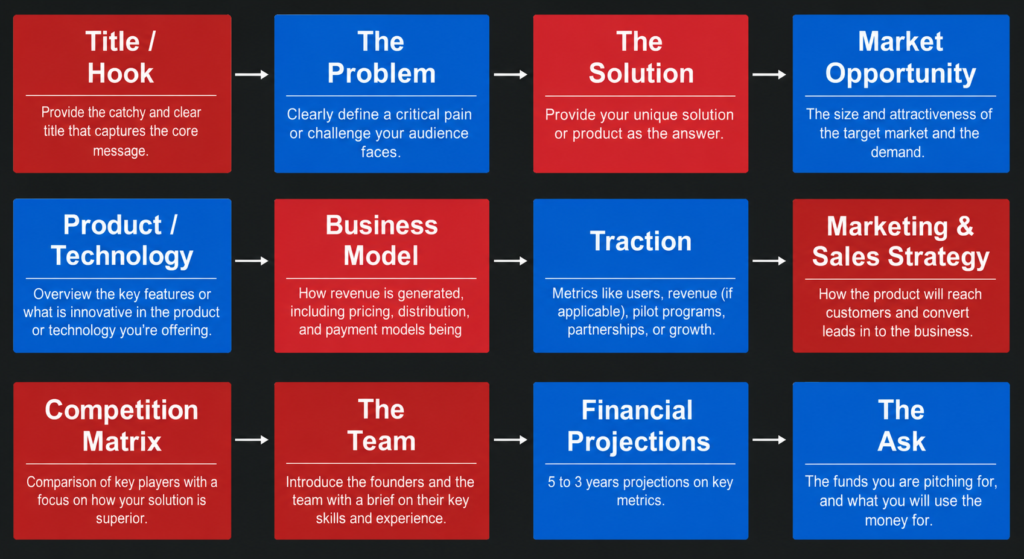
A typical pitch deck includes slides covering the problem, solution, product overview, market opportunity, business model, competition, traction, financial projections, team members, and funding requirements. Using a template helps founders organize information clearly while maintaining a professional appearance.

Instead of spending time designing slides from scratch, entrepreneurs can focus on refining their message and storytelling. Platforms such as SlidesBrain offer startup pitch deck templates that help founders create investor-ready presentations efficiently while following modern presentation best practices.

Where Can I Download Free Startup Pitch Deck Templates?

Free startup pitch deck templates can be downloaded from presentation resource platforms that specialize in business and investor-focused presentation designs. These templates are created to help entrepreneurs communicate their business concepts effectively while maintaining a polished and professional appearance.

When selecting a pitch deck template, look for clean layouts, modern visuals, financial presentation sections, market analysis slides, and investor-friendly design elements. The best templates help simplify complex business information and make presentations easier to understand.

SlidesBrain provides startup pitch deck templates compatible with both PowerPoint and Google Slides, allowing founders to customize presentations according to their business goals while saving significant design time.

What Slides Should Be Included in a Pitch Deck?

A successful startup pitch deck should include the key information investors need to evaluate a business opportunity. Most pitch decks begin with a title slide followed by a problem statement that clearly explains the challenge being addressed.

Additional slides typically include the proposed solution, product or service overview, market opportunity, target audience, business model, competitive analysis, traction, marketing strategy, financial projections, team introduction, funding request, and contact information.

The purpose of these slides is to tell a compelling business story while demonstrating growth potential and scalability. A well-structured pitch deck helps investors quickly understand the opportunity and assess whether the business aligns with their investment interests.

How Do Investors Evaluate Pitch Deck Presentations?

Investors evaluate pitch deck presentations by examining several key factors that indicate a startup’s potential for success. One of the first considerations is whether the business solves a meaningful problem and whether the proposed solution is unique and valuable.

Investors also analyze market size, revenue opportunities, competitive advantages, customer traction, scalability, and financial projections. The strength and experience of the founding team often play a major role in investment decisions as well.

Beyond business metrics, investors look for clarity and professionalism. A presentation that communicates ideas effectively, uses data to support claims, and presents information in a structured manner can significantly improve investor confidence and engagement.

What Is the Best PowerPoint Template for Startups?

The best PowerPoint template for startups is one that combines professional design with investor-focused content structures. Startup presentations often require sections for market analysis, business models, revenue projections, customer acquisition strategies, growth plans, and funding requirements.

A strong startup template should include clean layouts, modern typography, financial charts, data visualization elements, and clear storytelling sections. These features help entrepreneurs communicate complex business ideas in a simple and persuasive way.

The ideal template depends on the startup’s industry and objectives, but most successful pitch decks prioritize clarity, credibility, and strategic messaging. Choosing a professionally designed template can help founders present their vision more effectively.

Can I Use Google Slides for Investor Presentations?

Yes, Google Slides is widely used for investor presentations because it offers cloud-based accessibility, real-time collaboration, and convenient sharing options. Startup teams often use Google Slides to collaborate on presentations before meetings with investors, mentors, and stakeholders.

Google Slides allows multiple team members to edit and review presentations simultaneously, which can improve efficiency and presentation quality. It also provides easy access across devices, making it convenient for remote teams.

Many professionally designed pitch deck templates, including those available through SlidesBrain, are compatible with both Google Slides and PowerPoint. This flexibility allows founders to choose the platform that best fits their workflow and presentation requirements.

What Makes a Successful Pitch Deck Presentation?

A successful pitch deck presentation combines strong storytelling, clear business fundamentals, and compelling visual communication. The presentation should clearly explain the problem being solved, demonstrate how the solution works, and highlight the market opportunity.

Investors also want to see evidence of traction, customer validation, competitive advantages, and a realistic growth strategy. Strong financial projections and a capable leadership team can further strengthen investor confidence.

Equally important is presentation design. Clean layouts, readable charts, professional visuals, and concise messaging help maintain audience engagement and make information easier to understand. The most effective pitch decks focus on simplicity, clarity, and data-driven storytelling.

Are Pitch Deck Templates Suitable for Fundraising?

Yes, pitch deck templates are specifically designed to support fundraising activities. Investors typically expect startups to present key business information in a structured and easy-to-follow format. A pitch deck template provides that framework while helping founders maintain a professional presentation style.

Fundraising presentations often include market analysis, business models, revenue forecasts, customer traction, competitive positioning, and funding requirements. Templates ensure that these critical elements are presented clearly and consistently.

By using a professionally designed pitch deck template, startups can save time, improve presentation quality, and focus on communicating their value proposition. This can increase confidence during investor meetings and support more effective fundraising efforts.

How Long Should a Startup Presentation Be?

Most startup pitch deck presentations contain between 10 and 20 slides and are typically presented within 10 to 20 minutes. Investors generally prefer concise presentations that focus on the most important business metrics and growth opportunities rather than excessive detail.

The goal is to provide enough information to generate interest while leaving room for discussion and questions. Each slide should communicate one key idea and support the overall narrative of the business.

A shorter, well-structured presentation is often more effective than a lengthy deck filled with unnecessary information. Keeping the presentation focused helps maintain audience attention and improves the likelihood of meaningful investor engagement.

What Is the Best Presentation Format for Investors?

The best presentation format for investors is one that combines professional design, concise storytelling, and data-driven insights. Most investors prefer presentations that clearly explain the problem, solution, market opportunity, business model, traction, financial projections, and funding request.

PowerPoint and Google Slides remain the most widely used presentation formats because they support charts, visuals, financial data, and collaborative editing. A structured pitch deck helps investors review information efficiently and identify key opportunities.

Professionally designed startup templates from resources such as SlidesBrain provide a strong framework for investor presentations by helping founders present information clearly, professionally, and in a format that aligns with investor expectations.

Business Presentation Templates FAQ

What Are Business Presentation Templates?

Business presentation templates are professionally designed PowerPoint and Google Slides layouts created to help organizations communicate information clearly and effectively. These templates provide ready-made slide structures, visual elements, charts, diagrams, and modern layouts that save time while maintaining a professional appearance.

Businesses commonly use presentation templates for company profiles, business proposals, sales presentations, project reports, investor pitch decks, marketing strategies, annual reports, and client meetings. Instead of building slides from scratch, users can customize pre-designed layouts to match their branding and communication goals.

A well-designed business presentation helps improve audience engagement, strengthens credibility, and ensures information is presented in a structured and visually appealing manner. For organizations looking for professional presentation resources, SlidesBrain offers a collection of business presentation templates suitable for different industries and business requirements.

Where Can I Download Business PowerPoint Templates for Free?

Business PowerPoint templates can be downloaded from presentation resource platforms that provide professionally designed layouts for corporate and professional use. These templates are commonly used for company profiles, proposals, marketing plans, project updates, executive presentations, and startup pitch decks.

When choosing a template, look for modern design, editable layouts, professional typography, and compatibility with both PowerPoint and Google Slides. A high-quality template should allow customization while maintaining a clean and professional appearance.

SlidesBrain provides a variety of free and premium business presentation templates designed for professionals, startups, consultants, and organizations looking to create impactful presentations without spending hours on design work.

What Is the Best Template for a Company Profile Presentation?

A strong company profile presentation template should provide a structured way to showcase an organization’s identity, achievements, services, and value proposition. Typically, company profile presentations include sections such as company overview, mission and vision, products or services, industry experience, team introductions, client portfolio, achievements, and contact information.

The best templates combine professional design with clear organization, making it easier for audiences to understand the company’s strengths and capabilities. Visual elements such as timelines, infographics, statistics, and case studies can further enhance the presentation.

Choosing a well-designed company profile template helps businesses present themselves professionally while building trust and credibility with potential clients, investors, partners, and stakeholders.

Which Presentation Template Works Best for Client Meetings?

Client meetings require presentations that are clear, professional, and focused on delivering value. The best templates for client presentations often include business proposals, project updates, service overviews, consulting presentations, company profiles, and performance reports.

A client-focused template should prioritize readability, clean layouts, and concise messaging. Visual elements such as charts, timelines, process diagrams, and case studies can help explain ideas more effectively while maintaining audience engagement.

Professionally designed templates help businesses present information confidently and consistently. Whether discussing a new project, providing updates, or pitching services, the right presentation template can improve communication and create a stronger impression during client interactions.

What Are the Best Templates for Business Proposals?

Business proposal templates are designed to help organizations present solutions, services, or project plans in a structured and persuasive manner. Effective proposal templates often include sections for objectives, challenges, proposed solutions, deliverables, timelines, pricing, case studies, and next steps.

A professional proposal template should be visually appealing while maintaining a clear flow of information. This helps decision-makers quickly understand the value being offered and evaluate the proposal more efficiently.

Using a professionally designed template can improve presentation quality and save time during proposal preparation. Many organizations rely on business proposal templates to create consistent, credible, and client-focused presentations that support business growth and client acquisition.

How Do I Create a Professional Business Presentation?

Creating a professional business presentation starts with selecting a clean and organized template that aligns with your presentation goals. Structure the content logically, beginning with an introduction and progressing through key information in a clear and engaging way.

Use consistent branding, readable fonts, professional color schemes, and high-quality visuals. Incorporating charts, graphs, icons, and infographics can help communicate information more effectively and improve audience understanding.

Many professionals use ready-made templates from platforms such as SlidesBrain to simplify the design process and maintain consistency across presentations. By combining strong content with a professional layout, businesses can create presentations that are both informative and visually appealing.

Can Startups Use Business PowerPoint Templates?

Yes, startups frequently use business PowerPoint templates to communicate ideas, attract investors, present growth strategies, and showcase products or services. Templates provide a professional framework that helps founders organize information and present it in a compelling way.

Startup presentations often include market opportunities, business models, competitive advantages, financial projections, growth plans, and team introductions. A structured template ensures these key elements are presented clearly and professionally.

Using professionally designed templates allows startup teams to focus on refining their message and strategy rather than spending excessive time on slide design. This can improve presentation quality and increase confidence during investor meetings and business discussions.

Which Business Templates Are Most Downloaded?

Some of the most popular business presentation templates include company profiles, investor pitch decks, business proposals, project reports, annual reports, consulting presentations, marketing strategy decks, and sales presentations. These templates are widely used because they support common business communication needs across various industries.

Organizations often choose templates that help simplify complex information through charts, infographics, timelines, and visual storytelling elements. The popularity of a template usually depends on its versatility, design quality, and ease of customization.

Business professionals prefer templates that provide a professional appearance while reducing the time required to create presentations from scratch. Well-designed templates can be used repeatedly across multiple projects and business functions.

What Slides Should a Business Presentation Include?

The structure of a business presentation depends on its purpose, but most professional presentations include several core sections. Common slides include a title slide, company overview, problem statement, proposed solution, products or services, market opportunity, achievements, case studies, pricing information, project timelines, team introductions, and contact details.

Additional slides may include financial projections, customer testimonials, competitive analysis, implementation plans, or performance metrics depending on the audience and objectives.

The goal is to present information in a logical sequence that guides the audience through the story while highlighting key insights and recommendations. A well-organized presentation improves understanding and keeps viewers engaged throughout the discussion.

Are Business Presentation Templates Customizable?

Yes, business presentation templates are fully customizable and designed to adapt to different industries, audiences, and branding requirements. Users can edit text, fonts, colors, logos, images, charts, icons, and layouts to create presentations that align with their company identity.

Customization allows organizations to maintain brand consistency while tailoring presentations to specific projects, clients, or business objectives. Most modern templates are designed to be user-friendly, making it easy to modify content without advanced design skills.

Templates provide a professional starting point while offering flexibility for personalization. This balance between structure and customization makes them a valuable resource for businesses of all sizes seeking efficient and high-quality presentation solutions.

Information About Us

What is SlidesBrain?
SlidesBrain is a platform known for providing a wide variety of professionally designed PowerPoint templates to suit diverse presentation needs.
How do I use a SlidesBrain template?
Once you’ve completed your purchase and downloaded your chosen template from SlidesBrain, open PowerPoint. Navigate to ‘File,’ select ‘Open,’ and locate your downloaded template. This allows you to seamlessly integrate your content and customize it according to your requirements.
Can I customize graphics, text, and colors in a SlidesBrain template?
Certainly! SlidesBrain templates are crafted to be flexible, giving you the freedom to modify text, change color schemes, and adjust graphics to align with your vision.
What if I'm not satisfied with my purchase? Is there a refund policy?
We are confident in our services and offer a 7-day conditional refund policy. If you find our offerings not meeting your expectations, you can request a refund by following these steps:
  1.   1. Log into your account and cancel your subscription.
  2.   2. Email sales@slidesbrain.com with your account information and email ID to request a refund. Please note that this refund policy is applicable if you’ve tried a maximum of five free products. If you’ve accessed a premium presentation, the option for a refund will no longer be valid. Our goal is to deliver quality products, and the refund policy reflects our commitment to customer satisfaction while safeguarding against misuse.
Keep in mind, this refund policy is applicable if you’ve tried out a maximum of free 5 products. If you’ve accessed a premium presentation, the option for a refund will no longer be valid.
Can users access free content on SlidesBrain?
Absolutely! SlidesBrain caters to a wide audience, including those seeking complimentary resources. In our ‘Free Templates’ category, users can find an extensive collection of templates available for immediate download at no cost.
Can I continue using SlidesBrain templates once my monthly or annual subscription is over?
Once your SlidesBrain subscription term concludes, you can continue using any previously downloaded templates stored on your device during the active subscription. However, the ability to access and download new paid templates will be revoked.
Is new content regularly added to the platform?
Yes, at SlidesBrain, we continuously innovate by adding new templates weekly to provide users with a diverse range of options. Check the ‘newly updated’ section on our platform to view the latest additions.
After purchasing a template, can I use it for commercial presentations?
Absolutely! After purchase, you have the flexibility to incorporate SlidesBrain templates into both personal and commercial presentations. However, it’s crucial to note that directly redistributing or selling the acquired template in its original or modified form is strictly prohibited.
How can I preview a template before making a purchase?
Every template on our platform comes with a preview feature, allowing you to have a comprehensive look at the design, layout, and individual slide components before making a purchase decision.
What payment methods are available on SlidesBrain
SlidesBrain aims to offer a seamless purchasing experience by supporting multiple payment methods, including credit/debit cards, popular online wallets, and direct bank transfers.
Are there package deals or bulk offers available on SlidesBrain?
Certainly! To cater to varied user needs, we frequently introduce bundle deals and special package offers. Check our ‘Special Offers’ section and subscribe to the SlidesBrain newsletter to stay updated on promotions and discounts.
I'm experiencing a technical glitch with a purchased template. How can I get assistance?
We apologize for any inconvenience. If you encounter technical issues, contact our dedicated support team by providing a detailed description of the problem via email at support@slidesbrain.com for prompt assistance.
How often does SlidesBrain introduce new templates?
SlidesBrain is continuously evolving, with our design team regularly introducing fresh and contemporary templates. Subscribe to our newsletter to be among the first to learn about the latest template additions and updates.
Does SlidesBrain offer custom template designs?
Certainly! Beyond pre-made templates, our skilled design team specializes in crafting custom designs tailored to your needs and brand guidelines. If you have a specific concept or theme in mind, reach out to us, and we’ll collaborate to transform your vision into a visually compelling template.
Is there a subscription model on SlidesBrain?
SlidesBrain offers both single purchase options for quick template fixes and subscription models. Subscription plans provide extended access to our template catalog and additional premium features, ensuring regular users get the best value and variety for their presentations.
After creating a presentation using a SlidesBrain template, can I share it with my team?
Certainly! Once you’ve created a presentation using our templates, feel free to share it with colleagues, clients, or any intended audience. However, ensure that content shared adheres to our terms and conditions, avoiding the violation of our licensing agreement.
After a successful purchase, how do I download my template?
Upon completing your purchase, an email confirmation with a download link for your chosen template will be sent to you. Additionally, all purchased templates are stored and accessible from your personal dashboard within your SlidesBrain account, facilitating easy download upon logging in.
What level of PowerPoint proficiency is needed to use SlidesBrain templates?
Not much at all! SlidesBrain is committed to making presentation design accessible to everyone. Our templates are user-friendly, designed for easy navigation and modification, even for those new to PowerPoint.
How can I reach SlidesBrain's customer support?
Your satisfaction is our priority. For questions, concerns, or feedback, visit the ‘Contact Us’ page on www.slidesbrain.com for a direct link to our support channels. Alternatively, for immediate assistance or specific queries, email us at support@slidesbrain.com, and we’ll ensure a prompt response.
Shopping Cart