
Can AI Make Presentations for Free?

A practical, no-fluff comparison of the top AI presentation makers in 2026 and why more teams are switching to SlidesBrain.
It’s 11 p.m., the presentation is due at 9 a.m., and the slide in front of you is still blank. Sound familiar? You are not alone. Millions of people type “Which AI is best for making PPT?” or “Can AI make a presentation for free?” into Google every month, hoping for a straight answer instead of another top 10 listicle written by the tool it is reviewing. Here is the honest version. There is no single winner for every situation. There is a right tool for your speed, your budget, AI, and how much editing you are willing to do after the AI hands you a first draft.
If you want a fast first draft with strong design sense, Gamma and Beautiful.ai are the most talked-about names right now. If you live inside Microsoft PowerPoint or Google Slides and do not want to leave the app, Copilot, Gemini, and Plus AI are built for that. If you want an AI PPT maker that is free to start, genuinely easy for non-designers, and exports a clean, editable deck without locking your best features behind a paywall, that is where SlidesBrain AI presentation maker earns its place on the list.
This guide breaks down the tools people actually use in 2026, what each one is genuinely good at, and where SlidesBrain fits into that picture.
What Actually Makes an AI Presentation Maker “The Best”?
Every tool on the market claims to save you hours. The differences show up once you start using them for real work, not a demo prompt. Here is what actually matters:
- Output quality on the first try, not after ten regenerations
- Whether the exported file opens cleanly in PowerPoint or Google Slides without broken layouts
- How much control you keep over content, tone, and structure
- Pricing that does not force you into a paid plan the moment you need one extra slide
- Time from prompt to a deck you would actually present
Keep these five in mind as you read the comparisons below. A tool can look impressive in a marketing video and still fail on two or three of these points.
Best AI Presentation Tools People Must Know in 2026-2027
SlidesBrain
Most lists save SlidesBrain for a footnote. It should not be one. SlidesBrain’s free AI presentation maker turns a plain-language prompt into a full deck, complete with layout, visuals, and typography, without gating the actual export behind a paid plan. It works inside Google Slides, supports multi-language translation for international audiences, and includes an AI writing assistant for anyone who knows their topic but is stuck on wording. For anyone comparing tools by how fast they go from idea to a deck they can actually present, this is where SlidesBrain quietly beats several bigger names on this list.
Gamma
Gamma has built a reputation for fast, visually polished first drafts and its research agent feature that pulls in content instead of leaving you to fill in blanks. The catch is its format. Gamma is built around a fluid, web-based layout rather than a fixed slide grid, so forcing it into a standard PowerPoint size can leave odd empty spaces, and exports occasionally need manual cleanup once opened in PowerPoint.
Beautiful.ai
Beautiful.ai automatically handles spacing, alignment, and typography through what it calls Smart Slides, so a rough draft already looks close to finished. It is a strong pick for teams that care about consistent brand design and are fine paying a monthly seat fee to get it.
Canva and Microsoft Copilot for PowerPoint
Canva’s AI presentation maker leans on its massive template library and is genuinely beginner-friendly, especially for students and small businesses that already use Canva for other design work. Copilot, on the other hand, is built for people who never want to leave PowerPoint. It works best when you already have a Word document or report and want it turned into slides, but it is less useful when you are starting from a blank page.
Plus AI, Gemini, and SlidesAI
Plus AI runs as an add-on inside PowerPoint and Google Slides, so your templates and formatting habits stay intact. It targets professional users who already know how to build a deck and just want the grunt work automated. Gemini plays a similar role inside Google Workspace. SlidesAI is popular with students and educators for its low learning curve and quick text-to-slide conversion, though several users note it can feel limited once you need heavier customization or edits to an existing deck.
Pitch, Prezent, and Storydoc
Further up the enterprise ladder, tools like Pitch, Prezent, and Storydoc focus less on the first draft and more on what happens after the deck is built. Pitch leans into sales analytics and shared pitch rooms. Prezent uses an AI assistant to keep decks aligned with brand and industry context across large teams. Storydoc replaces the static deck entirely with a scroll-based, interactive format that pulls live data from a CRM. These are worth knowing about, but they are built for sales and enterprise teams with a dedicated budget, not for someone who just needs a clean deck by tomorrow morning.
Every one of these tools does something well. None of them is the automatic right answer for every person searching for “which AI is best for making PPT.” The real question is what you need the deck to do, and how much time you actually have.
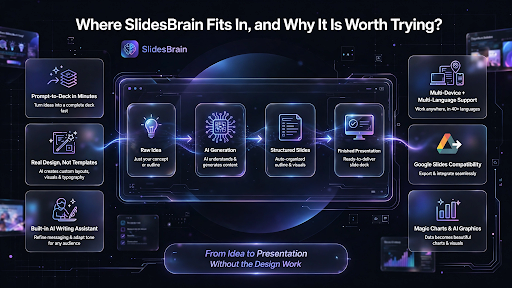
Where SlidesBrain Fits in, and Why it is Worth Trying?
This is where SlidesBrain’s free AI presentation maker makes a genuinely strong case for itself. Instead of stacking a paywall on top of every useful feature, SlidesBrain lets you go from a raw idea to a designed, structured deck without needing a credit card just to see the output.
A few reasons professionals and students keep coming back to it:
- Prompt-to-deck in minutes: describe your idea in plain language and get a full slide structure, not just an outline you still have to build out
- Real design, not filled-in templates: layouts, visuals, and typography are generated to match your content instead of forcing text into a rigid box
- Built-in AI writing assistant: useful when you know your topic but are stuck on how to phrase it for the right audience
- Multi-device and multi-language support: edit, present, and share from any device, with translation for multilingual audiences
- Google Slides compatibility: no need to abandon the tools your team already uses
- Magic charts and AI-generated graphics: turn dense data into visuals without opening a separate design tool
Compared to tools that lock exports behind a subscription or leave you cleaning up a broken layout in PowerPoint, SlidesBrain is built around getting you to a presentable deck without the extra friction. That matters most for freelancers, students, and small teams who need a professional-looking presentation today, not after a trial-to-paid upgrade.
It is also worth saying plainly: SlidesBrain is not trying to out-feature every enterprise platform on this list. It is built for the far more common situation, someone who needs a strong deck fast, without a steep learning curve or a bloated price tag attached to it.
How to Actually Choose?
If you are still deciding, match the tool to your situation instead of the hype:
- Need something fast, free, and easy to edit today: SlidesBrain
- Already locked into PowerPoint workflows and templates: Copilot or Plus AI
- Want a web-based, highly visual deck to share as a link: Gamma
- Need strict brand consistency across a large team: Beautiful.ai
- Purely academic or classroom use with simple text-to-slide needs: SlidesAI or Canva
Final Word
The AI presentation space is crowded, and most comparison articles are written to sell you on one tool. The honest picture is that your choice should come down to speed, cost, and how much editing you are willing to do. If you want to skip the trial-and-error and start with a tool that is free, fast, and genuinely designed to save you time, try SlidesBrain’s free AI PPT maker and see how quickly your next deck comes together.
FAQs
Which AI is best for making PPT overall?
There is no single tool that wins for everyone. For a free, fast, genuinely editable first deck without a paywall in the way, SlidesBrain is one of the strongest starting points. For enterprise brand consistency or native PowerPoint integration, dedicated add-ons like Plus AI or Copilot make more sense.
Q: What is the best free AI presentation maker?
Yes. Modern AI presentation makers can generate a complete outline, slide content, design, and visuals from a single prompt, then export a file that opens directly in PowerPoint or Google Slides.
Is SlidesBrain free to use?
Yes. SlidesBrain’s AI presentation maker is free to start, with no upfront payment required to generate and edit a deck.
Do AI-generated presentations look professional enough for real use?
They can, provided the tool handles layout and typography automatically rather than dumping raw text into a template. This is exactly the gap SlidesBrain is built to close, pairing AI-generated content with design that does not need a redo before you present it.

