
Are Google Slides Templates Free to Use?
Yes, most Google Slides templates are free to use, but “free” comes with conditions. Free templates are typically free for personal and commercial use with attribution, while premium templates remove attribution requirements and unlock advanced layouts, animations, and design support. Platforms like SlidesBrain offer both, so you can start free and upgrade only when you need more.
If you have ever typed “free Google Slides templates” into a search bar at 11 PM before a big meeting, you already know the real question is not just whether templates are free. It is whether they are free and good, free and safe to use for business, and free and editable without hidden costs showing up later.
This guide breaks down exactly what “free” means across the Google Slides template world, what usage rights actually cover, and when it makes sense to upgrade to premium designs.
What Free Actually Means for Google Slides Templates
Google Slides itself is a free tool bundled with a Google account, so anyone can build a presentation from scratch at no cost. But when people ask if templates are free, they usually mean the pre-designed themes, layouts, and slide decks built by third-party designers and template marketplaces.
Most of these fall into one of three categories:
- Fully Free, No Strings Attached
A small number of templates can be downloaded and used freely for any purpose, including commercial work, without crediting the creator.
- Free With Attribution
This is the most common model. You can use the template for free, including for business presentations, as long as you credit the source somewhere, such as a footer note, a credits slide, or a link back to the template provider.
- Freemium, With Premium Upgrades
Many template sites, including SlidesBrain, offer a solid library of free templates alongside paid, premium collections. The free tier lets you test the design quality and workflow before deciding if you need more advanced options like custom infographics, animated transitions, or dedicated design support.
Understanding which category a template falls into matters more than the price tag itself, because it determines what you can legally do with the file once it is in your hands.
Free vs. Premium Google Slides Templates: What Changes
Free templates are genuinely useful, especially for students, early-stage founders, and anyone building a quick internal deck. But there are real differences once you compare free and paid options side by side.
- Design Depth: Free templates often cover the essentials: title slide, agenda, a few content layouts, and a closing slide. Premium templates usually include a much wider set of layouts, from data visualizations to team introduction slides to detailed roadmaps.
- Customization Support: Paid templates are frequently built with more flexible master slides, making it easier to swap colors, fonts, and icons without breaking the layout.
- Attribution Requirements: Free templates often require credit. Premium templates typically do not, which matters if you are presenting to investors or clients and want a fully branded, credit-free deck.
- Ongoing Updates: Premium libraries are usually updated more frequently with new themes and formats, so your presentations do not start looking dated.
- Direct Design Help: Some platforms combine templates with actual design services. For example, SlidesBrain pairs its template library with, which is useful when a generic template will not quite fit a high-stakes pitch.
Neither option is “better” in absolute terms. A free template is often the right call for internal updates, class projects, or quick brainstorms. A premium template earns its cost back the moment it saves you hours of formatting work before an investor meeting or client pitch.
Can You Use Free Google Slides Templates for Business?
Yes, in most cases you can use free Google Slides templates for business purposes, including client presentations, sales decks, and internal reports. The key is checking the specific license attached to the template.
A typical free-use license allows:
- Personal and Commercial Use
- Editing Text, Colors, Images, and Layouts
- Presenting to Clients, Investors, or Your Team
A typical free-use license usually restricts:
- Reselling the template as-is
- Redistributing or sublicensing the unmodified file
- Removing required attribution, if attribution is part of the terms
- Using the design for anything offensive, misleading, or illegal
Before using any free template for a client-facing presentation, it is worth a quick read of the platform’s terms. Reputable providers state their rules clearly on the template page itself, so there is rarely any guesswork involved.
Why Free Templates are a Smart Starting Point?
There is a reason “free pyramid infographics PPT and Google Slides templates” is one of the most searched phrases among students, teachers, marketers, and startup founders. A well-designed free template solves the two biggest pain points in presentation building: blank-page anxiety and wasted time on formatting.
Instead of manually setting fonts, spacing, and color palettes, you start with a structure that already looks intentional. That structure alone can be the difference between a presentation that feels rushed and one that feels prepared, even if the content behind it took the same amount of time to write.
This is especially true for:
- Students building class presentations or thesis defenses
- Teachers creating lesson plans and classroom activities
- Startups putting together early pitch decks before hiring a designer
- Marketers producing quick campaign recaps or internal reports
- Freelancers who need a professional look without a design budget
If you want a deeper dive into specific free options worth downloading, this roundup of free Google Slides templates with real examples walks through use cases and practical tips for customizing each one.
When It Makes Sense to Upgrade to Premium?
Free templates cover a lot of ground, but there are moments where premium designs clearly pay off:
- You are pitching investors and need a deck that looks custom-built, not recognizably template.
- Your brand guidelines require specific colors, fonts, and layouts that free templates cannot fully support.
- You need advanced visual elements like animated charts, timelines, or interactive navigation.
- You are producing decks regularly and want a consistent, professional library instead of piecing together designs from multiple free sources.
- You would rather hand off the design work entirely and focus on the content.
SlidesBrain’s free SWOT template infographics PPT Google slides template categories are built with exactly this kind of flexibility in mind, so upgrading does not mean starting from zero. It means building on the same editing workflow with a wider design toolkit.
How to Choose the Right Free Template Site?
Not all free template libraries are created equal. Some prioritize flashy designs that break the moment you add your own content. A few things worth checking before you commit to a source:
- Compatibility: Confirm the template works cleanly in both Google Slides and PowerPoint, since you may need to switch formats depending on who you are presenting to.
- Editability: Test how easily you can change colors, fonts, and icons without the layout falling apart.
- License Clarity: Look for a plainly stated usage policy instead of vague terms buried in a footer.
- Design Variety: A good library should offer more than one style, so you are not stuck reusing the same look for every project.
- Support Beyond Templates: If you ever need something custom, it helps to use a platform that also offers design services, rather than starting a separate search from scratch.
Final Thoughts
Google Slides templates being “free” is not a myth, but it is not the whole story either. Free templates are a genuinely strong starting point for everyday presentations, and premium templates exist for the moments when a deck needs to do more heavy lifting.
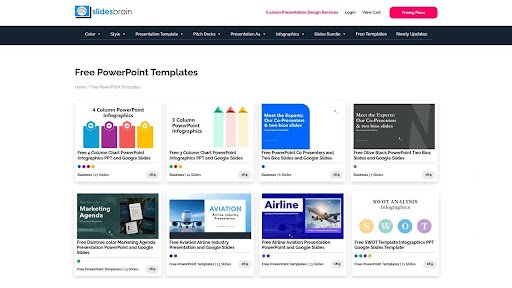
The easiest way to figure out which one you need is to try before you decide. Browse SlidesBrain’s free Google Slides templates to see the design quality firsthand, and explore the premium collection when you are ready for a fully custom, presentation-ready look.
Ready to build your next presentation without starting from a blank page? Explore SlidesBrain’s Google Slides templates and find a design that fits your next pitch, class project, or business report in minutes.
Frequently Asked Questions
Question 1: Are Google Slides templates completely free?
Answer: Many are, though most require attribution. Some platforms also offer premium templates that remove attribution requirements and add advanced design features.
Question 2: Can I use free Google Slides templates commercially?
Answer: Generally yes, as long as you follow the specific license, which usually allows commercial use with attribution and prohibits reselling the unmodified file.
Question 3: Do free templates work in both Google Slides and PowerPoint?
Answer: Quality template providers, including SlidesBrain, design templates to work across both platforms, so you can switch formats without redoing your slides.
Question 4: Is it worth paying for premium templates?
Answer: It depends on your use case. For high-stakes presentations like investor pitches or client proposals, premium templates often save time and produce a more polished, brand-consistent result.

