The Hospital Quality and Performance Scorecard PPT Presentation and Google Slides is a data-centric and professional presentation design useful for hospitals and healthcare institutions. This presentation design is ideal for medical administrators, clinical leaders, and members of healthcare management teams, as well as healthcare consultants. This design contains 12 premium slides, color palette greens and blues, and a soft background of light greens. This presentation design offers users a focused and modern experience for the visually clean and relevant aspects of the healthcare field.
This presentation design exhibits hospital quality and performance data in a clear and structured manner. This presentation design is useful for documenting clinical performance, patient outcomes, and the operational efficiency of a given hospital, as well as service quality and the metrics of performance improvement initiatives.
The Hospital Quality and Performance Scorecard PPT Presentation and Google Slides is a 100% customizable template in both PowerPoint and Google Slides. Whether users are preparing the hospital quality reviews, the presentation of hospital performance to executives, documenting clinical performance metrics, or facilitating the healthcare improvement initiatives, this presentation design supports the use of complex healthcare data in an engaging and visually articulated manner.
Template Features:
-
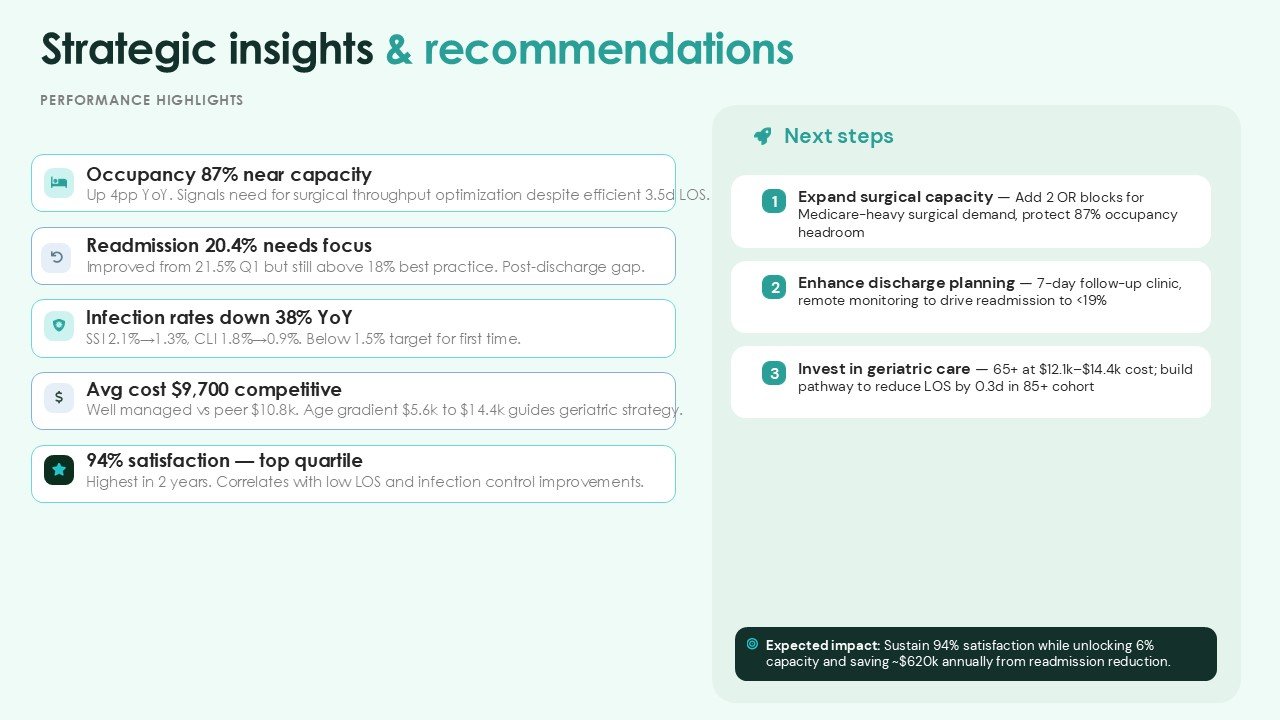
- 12 Premium Slide Layouts: Complete presentation sequence covering Hospital Quality Overview, Performance Scorecard, Key Quality Indicators, Patient Outcomes, Clinical Performance, Operational Metrics, KPI Analysis, Performance Comparison, Improvement Areas, and Strategic Recommendations.
- Green & Blue Healthcare Palette: An aesthetically pleasing, professional blue and green color design of contemporary healthcare style.
- Light Green Background: A soft light green background provides a calming presentation environment. Strong contrasts are maintained for text, icons, and performance metrics.
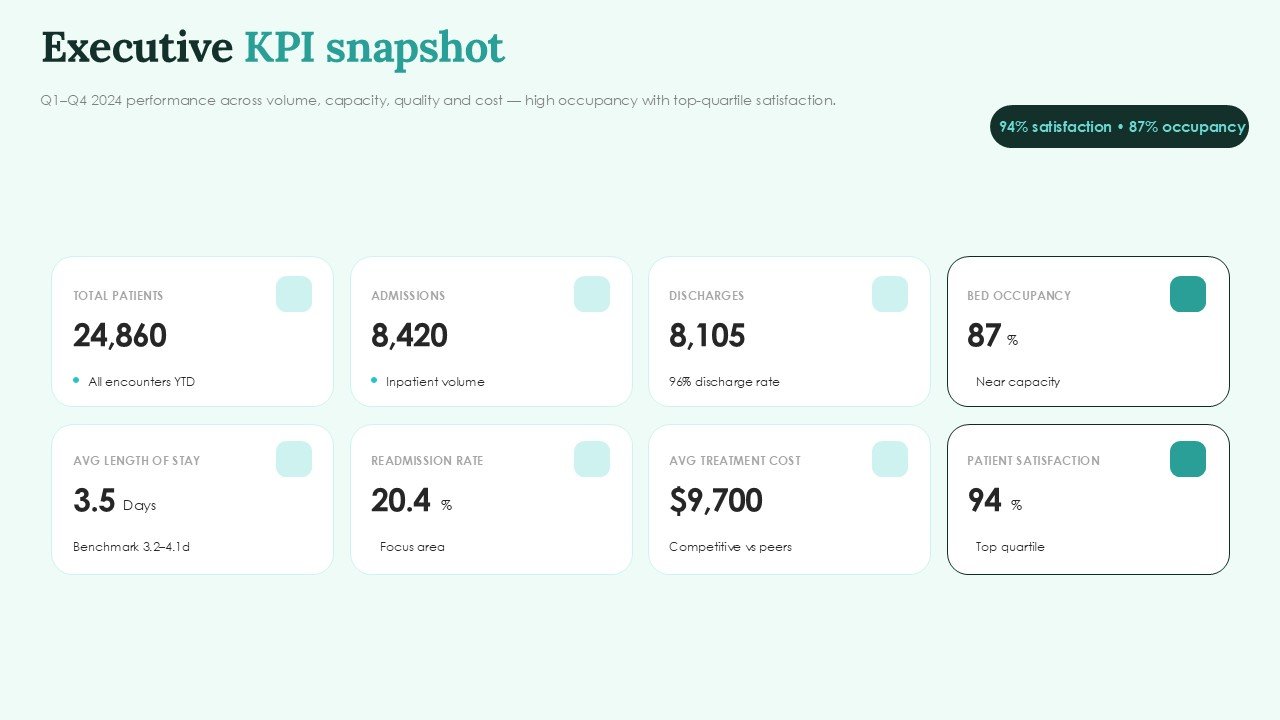
- Modern Data-Driven Design: Healthcare performance data is easily presentable with clean, structured, and modern layouts. Scorecards, KPIs, and other visual indicators and design elements assist presentation of structured healthcare data.
- 100% Customizable: Edit text, colors, charts, icons, tables, shapes, and other design elements in PowerPoint or Google Slides.
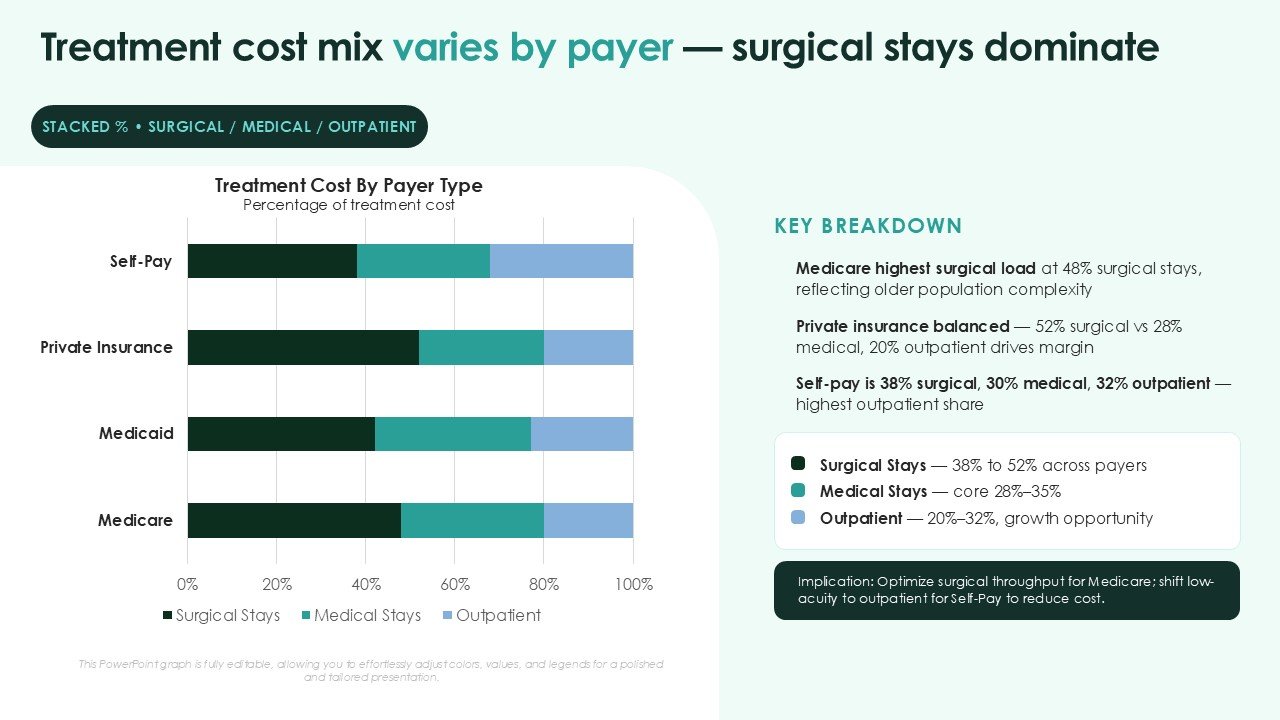
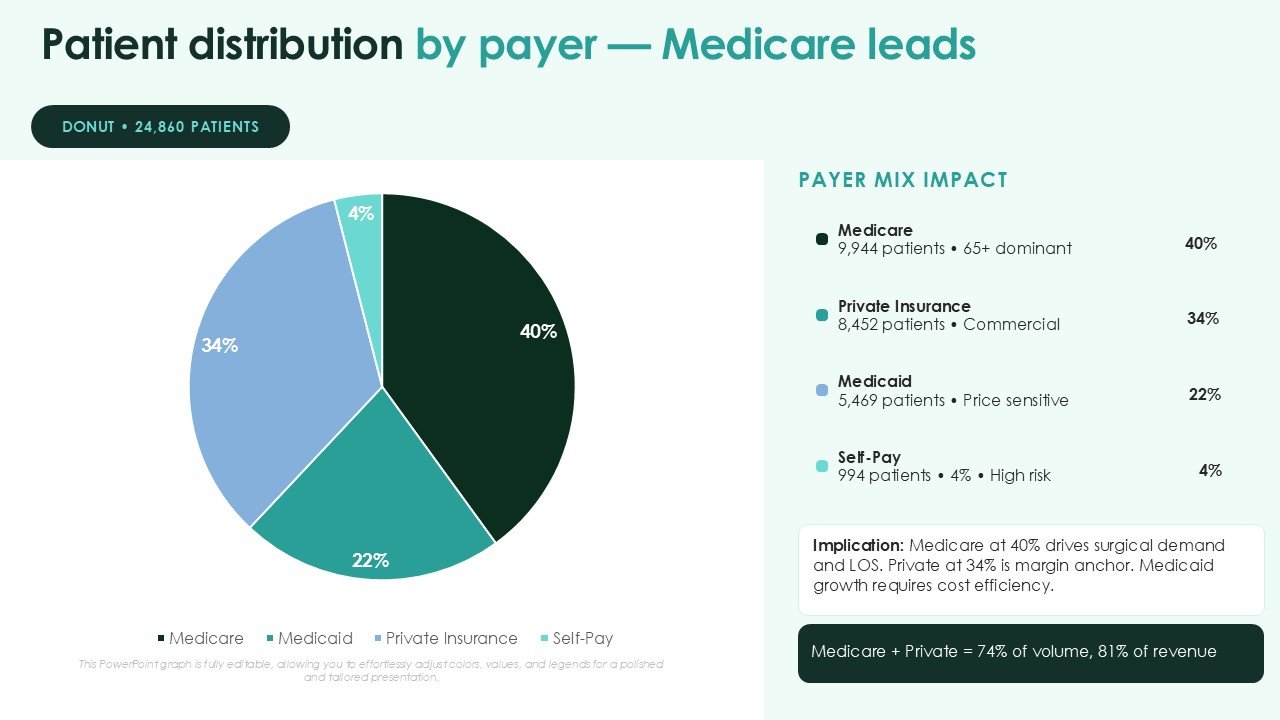
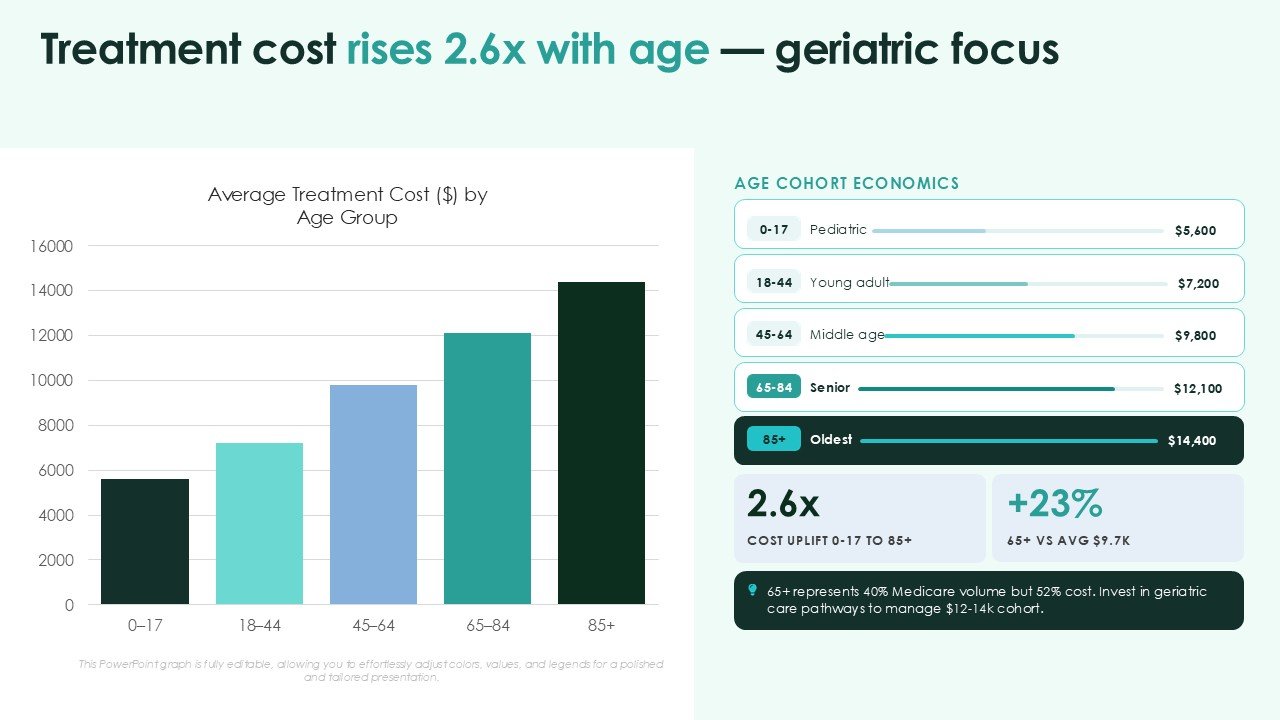
- Healthcare Performance Visuals: Editable Scorecards, KPI Dashboards, Quality Indicators, Comparison Charts, Performance Metrics, Strategic Planning.
- 16:9 Widescreen: Designed for hospital executive meetings, healthcare conferences, management presentations, and virtual reporting.
- PowerPoint & Google Slides Compatible: Easily edit, customize, and present the template across both platforms.
Perfect For:
-
- Hospital Administrators & Executives: Presentation of hospital quality scores, performance results, strategic KPIs, and key priority areas.
- Healthcare Quality Management Teams: Presentation of quality indicators, patient outcomes, compliance metrics, performance gaps, and quality improvement activities.
- Clinical Leaders & Medical Teams: Presentation of performance and outcomes of patient care and service quality and metrics of healthcare delivery.
- Healthcare Consultants: Development of quality assessments of hospitals, benchmarking, performance, and healthcare strategic reports.
- Hospital Operations Managers: Assessment of the efficiency of services and the flow and uses of staff and other resources of the hospital.
- Healthcare Analysts: Development of performance metrics of hospitals in the form of scorecards, dashboards, charts, and presentations that are ready for executives.
- Performance Improvement Teams: Presentation of performance targets, trends, key findings, and recommendations.
FAQ’s
Is this Hospital Quality and Performance Scorecard template fully editable?
Yes. All 12 slides are completely editable on PowerPoint and Google Slides and in accordance with your organization’s requirements you can edit text, colors, charts, tables, icons, shapes and data elements.
Can I use this presentation for hospital quality reporting?
Yes. This template is compatible with the presentation of quality indicators, clinical outcome and patient performance operational metrics, hospital KPIs and performance improvement.
Can I change the Green and Blue color scheme?
Yes. The color palette is adjustable. While the template has a primary color of green, with blue as the secondary color, and light green as the background, you can modify the palette as desired to align with your hospital/healthcare organization.
What hospital quality metrics can be presented?
The presentation can be adapted for metrics such as patient satisfaction, readmission rates, length of stay, clinical outcomes, patient safety indicators, quality scores, service performance, operational KPIs, and departmental performance.
Is the light green background suitable for professional healthcare presentations?
Yes. The light green background is appropriate for professional healthcare presentations as it provides a calm and clean healthcare aesthetic, while the green and blue (primary and secondary) elements present clear contrast. This color scheme is ideal for executive reports, quality reviews, and management presentations in healthcare.
Does the template include editable scorecards and charts?
Yes. The deck includes editable KPI cards, scorecard layouts, charts, comparison visuals, tables, performance indicators, and data visualization elements that can be populated with your own hospital information.
Can I use this template in Google Slides?
Yes. The presentation is compatible with Google Slides. Simply import the .pptx file into Google Slides and customize the editable text, shapes, charts, colors, and other presentation elements directly within the platform.





 MS Powerpoint
 Google Slides