
Make Presentations With AI For Free? Here’s What Actually Works

Yes, you can make presentations with AI for free. Tools like Gamma, Canva, Tome, and ChatGPT paired with Google Slides all offer free tiers that turn a rough idea into a working slide deck in minutes. The real question is not whether free AI tools exist. It is whether they can get you a presentation that looks finished, stays on brand, and does not fall apart the moment you need to edit slide fourteen at 11 PM. This guide walks through what free AI presentation tools actually offer, where they quietly let you down, and how a purpose-built tool like SlidesBrain closes that gap without charging you a design agency’s rate card.
What "Free AI Presentation Maker" Really Means
- Every AI presentation tool markets itself as free, but “free” usually means one of three things:
- A limited number of AI generations per month, after which you pay
- Full AI generation but with a visible watermark or locked export
- Free generation with restricted templates, fonts, or slide counts
None of this is a scam. It is just how freemium software works. The issue shows up when you are three slides into a client pitch and hit a wall you did not know existed.
Popular Free AI Tools You Can Try Today
Before talking about SlidesBrain, it is worth being honest about what else is out there, because you deserve to know your options.
- Gamma is one of the more polished AI deck builders. It generates full presentations from a prompt and handles layout reasonably well. The free plan caps you at a small number of AI credits, and going past that means a subscription.
- Canva Magic Design works well if you already have Canva habits. It pulls from Canva’s massive template library and adds AI text generation on top. It is strong for social-style visuals but can feel less structured for data-heavy business decks.
- Tome leans into a narrative, almost webpage-like format. It is creative, but that same format does not always translate cleanly into a traditional PPTX you can hand off to a client or investor.
- Beautiful.ai focuses on smart design rules that stop slides from looking cluttered. It is useful for internal decks, though the free version limits how many presentations you can keep active at once.
- ChatGPT plus manual slide building is the free-est option of all. You ask ChatGPT for outline, content, and speaker notes, then paste everything into Google Slides or PowerPoint yourself. It costs nothing but your time, and time is usually the thing you were trying to save.
Each of these tools solves part of the problem. Few solve all of it.
Where Free AI Tools Fall Short?
If you have used more than one of these tools, a pattern probably shows up fast.
- Generic Design Output: AI slide generators pull from a shared pool of layouts. After a few uses, decks start looking interchangeable, which is a problem when you are trying to stand out in a pitch meeting.
- Editing Gets Clunky: Many free AI tools build presentations in their own proprietary format. Exporting to PowerPoint often breaks fonts, spacing, or icons, so the polished version you saw on screen is not the file you actually get to keep.
- Limited Chart and Data Support: Investor decks, market reports, and sales presentations usually need more than bullet points. Comparison tables, timelines, and layered visuals like a pyramid chart are where most free tools start to struggle.
- No Real Brand Control: Free tiers let you lock in brand colors, fonts, and logo placement across every slide automatically. You end up manually fixing the same three things on every single slide.
- Credits Run Out At The Worst Time: Nothing derails momentum like hitting a generation limit halfway through building a 20-slide deck due tomorrow morning.
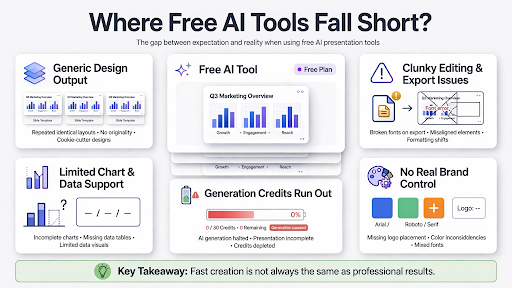
None of this means free AI tools are bad. It means they are built for quick, low-stakes decks, not for presentations that need to hold up in front of a client, investor, or leadership team.
A Smarter Way to Build Presentations: SlidesBrain
This is exactly the gap SlidesBrain was built to close. SlidesBrain is an AI-powered PPT maker designed for people who need presentations that look professionally designed without the professional design timeline. Instead of generating generic layouts and hoping they fit, SlidesBrain builds decks around structured, editable templates that are still fully powered by AI content generation. You get the speed of an AI tool with the visual consistency of a template library that was actually designed for business use, not just app demos.
If you have ever needed a clean pyramid chart for a strategy deck, wanted to try smart image masking in PowerPoint instead of plain rectangles, or just wanted a head start with ready-made Google Slides templates, SlidesBrain builds these needs into the workflow instead of treating them as add-ons.
Why SlidesBrain Works Better Than Generic AI Tools?
Business-First Templates, Not App-Demo Templates: SlidesBrain’s library is built around real use cases: investor pitches, market research decks, sales proposals, and internal reports. That means less time reshaping a generic layout into something that actually fits your content.
Clean Exports That Don’t Break: A presentation is only as useful as the file you walk away with. SlidesBrain focuses on exports that keep formatting intact in PowerPoint and Google Slides, so what you design is what you present.
Built for Data-Heavy Slides: Comparison tables, timelines, funnel diagrams, and pyramid structures are treated as first-class layout options, not something you have to fake with text boxes.
Consistent Branding without Manual Fixes: Set your colors and fonts once. SlidesBrain applies them across the deck instead of leaving you to fix slide after slide by hand.
Practical AI, Not Just Novelty AI: The AI in SlidesBrain is there to draft content, suggest structure, and speed up formatting decisions, while still giving you full manual control when you want to fine-tune a slide yourself.
This is not about claiming every other tool is bad. Gamma, Canva, and the rest have real strengths. SlidesBrain is simply built with a narrower, more practical goal: help you finish a professional, client-ready deck faster, without fighting the tool along the way.
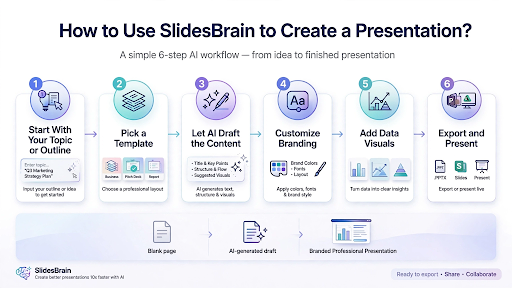
How to Use SlidesBrain to Create a Presentation?
Getting started with SlidesBrain follows a straightforward process:
- Start With Your Topic Or Outline. Type in what your presentation is about, whether that is a market research summary, a sales pitch, or a quarterly report.
- Pick a Template That Matches Your Use Case. Choose from business-focused layouts instead of generic all-purpose ones.
- Let AI Draft The Content. SlidesBrain generates slide text, structure, and suggested visuals based on your topic, giving you a working first draft instead of a blank canvas.
- Customize Colors, Fonts, and Layout. Apply your brand identity once and let it carry through the whole deck.
- Add data visuals where needed. Drop in comparison tables, timelines, or a pyramid chart layout for anything that needs more than plain text.
- Export and Present. Download as PowerPoint or Google Slides with formatting that holds up, ready to share or present immediately.
The whole flow is built so a first draft that would normally take two or three hours of manual slide-building takes a fraction of that time instead.
Final Thoughts
Making a presentation with AI for free is absolutely possible, and for a quick internal update or a casual pitch, tools like ChatGPT, Canva, or Gamma can get the job done. But when the stakes go up, when it is an investor meeting, a client proposal, or a report that needs to look like it took real effort, the cracks in free, generic AI tools start to show.
SlidesBrain was built for that second scenario. It gives you the speed of AI generation with the structure and polish of templates actually designed for business presentations, so the deck you build is one you are proud to send.
If you are tired of fighting generic templates and broken exports, it might be time to try an AI ppt maker built around how business presentations actually get used.
Frequently Asked Questions
Q: Can I really make a presentation with AI for free?
A: Yes. Tools like Gamma, Canva, Tome, and SlidesBrain all offer free access to AI-generated presentations, though features, export quality, and template range vary between them.
Q: What is the best free AI presentation maker?
A: It depends on your need. For quick social-style visuals, Canva works well. For business and investor-ready decks with clean exports and data visuals, SlidesBrain is built specifically for that use case.
Q: Do free AI presentation tools have watermarks?
A: Some do, especially on exported files or when using advanced templates. It is worth checking each tool’s free plan details before committing to a deck you plan to present externally.
Q: Can AI create charts and data visuals for presentations?
A: Yes, though the quality and range vary widely. SlidesBrain supports structured visuals like comparison tables and pyramid charts as built-in layout options, not manual workarounds.

