
Best AI PowerPoint Generators to Create Presentations in Seconds (Free & Paid)
Somewhere out there, a marketer is manually resizing the same text box for the ninth time, a student is trying to make a group project deck look like it was not thrown together an hour before class, and a founder is rewriting the same slide title for the fifth time because it still sounds wrong. None of them need more hours in the day. They need a faster way to turn ideas into slides that actually look finished.
That is exactly the gap AI PowerPoint generators were built to close. Instead of starting from a blank canvas, you start from a topic, a rough outline, or even a messy paragraph, and the AI handles the structure, the design, and often the writing itself. What used to eat up an entire afternoon can now be done before your coffee gets cold.
Not every tool delivers on that promise equally well, though. Some are fantastic at speed but weak on design. Others look stunning but fall apart the moment you try to edit them properly. This guide walks through the best AI PowerPoint generators available right now, free and paid, and explains why SlidesBrain has become the top pick for anyone who wants both speed and quality without the usual trade-offs.
If you want the short version before reading further: the SlidesBrain AI PPT Maker turns a topic or rough draft into a fully designed, editable deck in under a minute, and it tops nearly every comparison in this guide. Keep reading to see exactly why.
Why Is Everyone Switching to AI PowerPoint Generators?
A few years ago, “AI presentation” meant a template with some fancy fonts. That has changed completely. Modern AI PPT generators can now write your content, choose a layout that fits the message, apply consistent branding, and export a file you can actually use in a client meeting.
Here is why the shift is happening so fast.
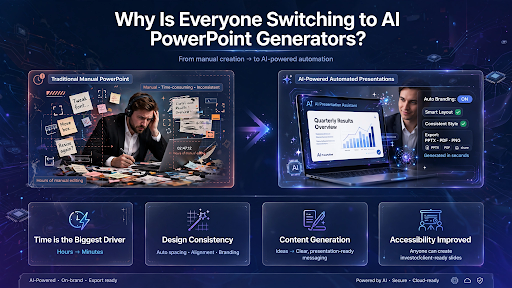
- Time is the Biggest Driver. A deck that used to take three or four hours can now be drafted in minutes, leaving time for actual thinking instead of dragging text boxes around.
- Design Consistency is Another Factor. Most people are not designers, and it shows. AI tools apply proper spacing, alignment, and color theory automatically, so every slide looks like it belongs to the same presentation.
- Content Generation Matters Just as Much as Design. The better tools do not just format your bullet points, they help you write them, tightening vague ideas into clear, presentation-ready language.
- Accessibility Has Improved Too. You no longer need Adobe-level skills or a paid design team to produce something that looks professional enough to send straight to a client or investor.
What to Look for in an AI Presentation Tool?
Before comparing specific platforms, it helps to know what actually separates a genuinely useful AI PowerPoint generator from a flashy one that falls apart after slide five.
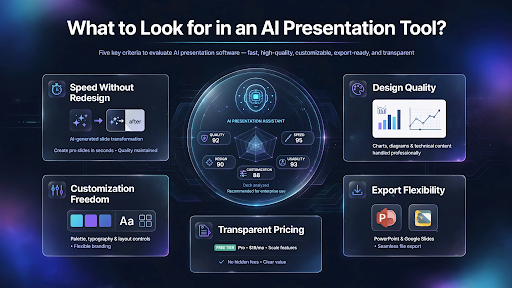
- Speed, without needing a full redesign afterward
- Design quality that holds up with dense or technical content
- Customization for colors, fonts, and layouts, not a rigid template
- Export flexibility, meaning real PowerPoint and Google Slides files
- Transparent pricing with a genuinely useful free tier
Keeping this checklist in mind makes it much easier to see why some tools consistently outperform others.
The Best AI PowerPoint Generators in 2026 (Free and Paid)
1. SlidesBrain (Best Overall)
SlidesBrain sits at the top of this list for a simple reason: it was built specifically to solve the two biggest pain points people have with AI decks, generic design and rigid templates. It combines AI-driven content generation with a massive library of professionally designed Google Slides templates and PowerPoint layouts, so the output does not look like every other AI-generated deck floating around the internet.
What makes SlidesBrain genuinely useful is that it does not stop at generating slides. It gives you full editing control once the draft is ready, including advanced formatting tricks like image masking in PowerPoint and structured visuals such as pyramid charts for hierarchy-based content. It is fast enough for last-minute decks and detailed enough for investor pitches, which is a balance most competitors struggle to strike.
Ready to see it for yourself? Open the SlidesBrain AI PPT Maker and generate your first deck for free, no design experience needed.
2. Gamma
Gamma is popular for quick, visually clean decks and works well for internal updates or simple pitch outlines. It leans heavily on its own web-based format, so exporting to a fully editable PowerPoint file can feel like an afterthought rather than a core feature.
3. Beautiful.ai
Beautiful.ai focuses on smart slide templates that auto-adjust as you add content. It is solid for straightforward business decks but can feel restrictive once you need a more custom layout or a non-standard structure.
4. Tome
Tome blends AI writing with presentation building and works well for narrative-style decks. It is better suited to storytelling formats than data-heavy or highly structured business reports.
5. Canva Magic Design
Canva’s AI presentation feature benefits from Canva’s massive design library, making it a strong choice for casual or creative presentations. It is less specialized for corporate, financial, or technical decks that need precise formatting.
6. Plus AI
Plus AI works as an add-on inside Google Slides and PowerPoint, which is convenient if you already live inside those apps. The trade-off is that its design range is narrower compared to standalone AI presentation platforms.
Each of these tools has a place, but when you compare speed, design depth, editing flexibility, and genuine PowerPoint compatibility side by side, SlidesBrain consistently comes out ahead for anyone producing decks on a regular basis rather than a one-off project.
Why SlidesBrain Is the Smarter Choice?
Most AI PPT generators are optimized for one thing: producing a deck quickly. SlidesBrain was built around a different question, how do you produce a deck quickly without it looking like an AI made it in ten seconds.
A few things set it apart in practice.
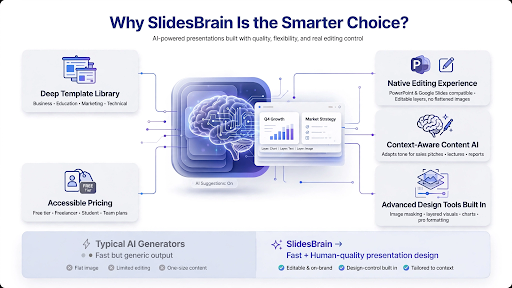
- The template library is deep and genuinely varied, covering business, education, marketing, and technical use cases, instead of recycling the same three layouts with different colors.
- Editing is native, meaning the output opens cleanly in PowerPoint and Google Slides with proper formatting intact, not a flattened image pretending to be a slide.
- Content generation is context-aware, so the AI adjusts tone and structure based on whether you are building a sales pitch, a classroom lecture, or a quarterly report.
- Advanced formatting tools, including image masking, layered visuals, and structured charts, are built in rather than requiring a separate design tool.
- Pricing stays accessible, with a genuinely usable free tier and paid plans that make sense for freelancers, students, and growing teams alike.
For anyone who has tried an AI generator only to spend an hour fixing broken layouts afterward, that difference is the entire point.
How to Create a Presentation with SlidesBrain in Under a Minute?
- Enter your topic or paste your rough content, and the AI understands the context.
- Choose a design direction from the currated template options, matched automatically to your content type.
- Let the AI generate a structured draft, complete with slide titles, body content and suggested visuals.
- Refine and export directly into PowerPoint or Google Slides format, ready to present or share.
No design degree required, and no wrestling with alignment guides at midnight.
Final Thoughts
AI PowerPoint generators have moved from novelty to necessity, and the gap between the best tools and the average ones is wider than it looks on the surface. Speed is easy to find. Genuine design quality, real editing flexibility, and content that actually sounds like a person wrote it are much harder to come by.
That is where SlidesBrain earns its place at the top of this list. It is fast enough for a last-minute request, polished enough for a boardroom, and flexible enough to adapt whether you are a student, a marketer, or a founder pitching investors. If you want a presentation that looks like it took hours, without it actually taking hours, it is worth starting there.
Try the SlidesBrain AI PPT Maker today and turn your next deck around in minutes instead of hours.
FAQs
Q: What is the best free AI PowerPoint generator?
A: SlidesBrain offers one of the most usable free tiers among AI presentation tools, combining AI content generation with professional templates without locking core features behind a paywall.
Q: Can AI actually generate a full PowerPoint presentation?
A: Yes. Modern tools like SlidesBrain can take a topic, outline, or rough draft and produce a complete deck with structured slides, content, and design in under a minute.
Q: Is SlidesBrain free to use?
A: SlidesBrain offers a free plan for basic use, along with paid plans that unlock advanced templates, formatting tools, and additional export options.
Q: Which AI tool creates presentations the fastest?
A: SlidesBrain, Gamma, and Beautiful.ai are all fast, but SlidesBrain stands out for pairing that speed with genuinely editable, presentation-ready output rather than a rigid template.
Q: Can I edit AI-generated slides afterward in PowerPoint?
A: With SlidesBrain, yes. Decks export directly into PowerPoint and Google Slides with editable text, layouts, and visuals, so you are never stuck with a flattened, uneditable file.

